What should be included in a business dashboard?
The four most fascinating aspects of building a business dashboard — How to start using it? Just take a quick look in a glance

This article discusses the most important and critical aspects of a business dashboard that must be included in your business dashboard and how to begin using it at a glance.
Business dashboards are extremely important for a great number of reasons for visualizing your business data: They help you to manage business complexities, provide quick access to authentic information about your business, and help you in following through with action to be taken.
No one can refuse their benefits and importance and wanted to create one but might be not sure how and from where to start. You might have heard this story so many times before, so I have written this blog for you.
So, let's get started. First of all, you should know the stakeholders of your audience. Your audience is the senior-level management at your organization, a group of departmental directors, or C-level leadership you should keep this in your mind.
It does no harm for you to share bad news with your senior management, as a business dashboard is meant particularly for the senior-level management and not for consumption outside of the business unit. Although, there’s a common practice in many organizations to add spin to certain news as it makes someone upset in the management chain, but that is the wrong practice for a solid business dashboard. The truth needs to be out there so the senior-level leadership in your organization can see the problems the organization is facing and make the right decisions to overcome the problem.
To keep that in mind, I’ve outlined a few important things you must include in your business dashboard template—and some additional tips and tricks to get you on your feet.
1. Include RAG status indicators to your business dashboard

RAG —or red, amber, green—statuses are important to include on a business dashboard template so the stakeholder knows what's important and what to focus on. RAG acts as traffic lights, red is an alert, amber (or yellow) signals caution, and green means you’re in the clear. If a measure is green, the stakeholders know this is in a comfortable area and to skip over it so they can pay more attention to those that are the possibility of something unwelcome, such as yellow and red are examples.
2. Balance of Key Performance Indicators
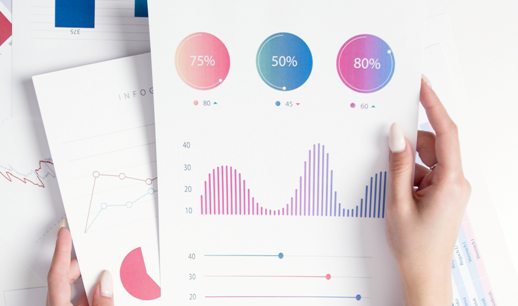
It’s important to have a balance of KPIs across all of your graphs. Because management meetings tend to depend a great deal on financial metrics, but may not take into consideration things happening in the organization that could be affecting those financials. Using it has been observed that a strategic framework allows you to incorporate measures from across your organization, effectively solving this problem. You can, for instance, look at your HR metrics to ensure that the right people are in the right positions and at the customer, metrics to see if your customers are happy.
If you need some ideas of what is important to include, take a look at these KPI dashboards:3. Include qualitative analysis for quick interpretation.

Executive team can easily understand if you provide numbers along with the qualitative analysis. Simply providing numbers leaves a lot of room for interpretation from the team, but adding context gives them the complete story. There’s a big difference between saying, “Our sales are down for the month of March,” and saying, “Our sales are down for the month of March because no one wants to buy winter clothes when it’s 70 degrees outside. As we see this trend consistently year after year. As our customers begin thinking about winter in November through February, our sales will go up.”
In the above example, you can see how providing qualitative information that can be consumed by the executive team easily is important.
4. Include major projects and initiatives.
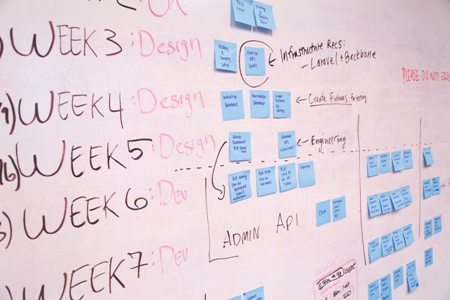
You must realize that most people think their project should be prioritized for one reason or another. If you’re the person working with the management team, you'll only include the most critical projects in the business dashboard and filter out the low weightage projects.
If a project is important enough to be discussed at the managerial level, it likely involves multiple departments and is critical to the business at large. For example, if the Finance department is trying to create a new committee, that’s not a whole-of-business initiative. But if they’re opening a new cost center—which likely involved several teams and a great deal of oversight—this likely qualifies as something the management team needs to be briefed on.
To determine how often the management team will meet to review the business dashboard, it depends on several factors, including how much information is available and how often those metrics are useful. Do they need to meet quarterly or would it be more useful to meet every month?
Regardless of what you choose, you need to stick to a schedule and have a regular reporting process. Everyone in the organization should know when to sit down to review the business dashboard. This keeps all the stakeholders moving fluidly and helps keep those who need it on track with deadlines.
Conclusion:, business dashboards are very important, so you might be feeling pressure from your team, executive group, or competitors to create one. But before you do, be sure to think through its purpose, focus, and use, so it’s as effective as possible.
Are you ready to try your hand at business dashboard ? Try Business Dashboard free ever!
George Lewis, Digital Marketing @DashboardBuilder
How to create a KPI dashboard without writing a single line of code
Creating a perfect KPI dashboard is a method that extends far beyond your computer skills. I found a lot of people jump right into the creating phase of building a KPI dashboard without getting the thinking process done. They think their KPI dashboard software will automatically create it.

Building a KPI dashboard is an iterative process that requires a lot of thought and plan. The most important thing you should know that you intend to monitor key performance indicators (KPIs) on a dashboard; it’s quite another to actually build a dashboard.
As opposed to thinking about the data and or the KPI dashboard tool or even the Key Performance Indicators, let get started to create a KPI dashboard in a different way. Think about your audience, think about who will be using your dashboard and why they want it. The critical success factor for your KPI dashboard must be aligned for a KPI dashboard solution. As with all things technology, it’s the human element that poses the highest level of difficulties.
5 easy steps to create a KPI dashboard
I have tried to outline for creating a KPI dashboard step by step in detail below.
- Define your key performance indicators
- Select your dashboard’s template
- Choose your KPI dashboard software
- Gather and visualize your data
- Share your KPI dashboard
1. Defining your key performance indicators
Well-defined KPIs are the flashpoint of your dashboard. With a meaningless KPI, you might as well be watching the sky for signs that your business is successful. Defining KPIs is actually aligning your business objectives to your business processes. There are lots of KPI examples out there, but the correct way to succeed is by asking questions about your business.

Take the time to understand who you’re building the dashboard for, and you’ll soon understand why you’re building a dashboard in the first place. To define your KPIs matrices, you must start having conversations with the stakeholders from all areas of your business. Asking for input is the first step in drumming up buy-in for a KPI dashboard. Stakeholders will tell you what’s important to them, and this will make your job of creating a dashboard much easier.
An executive will have different data requirements than a manager for example executives may spare more towards a reporting dashboard while a manager may need an operational dashboard. The time you spend consulting with stakeholders will definitely save you time creating the KPI dashboard.
2. Select your dashboard template
With pre-build dashboard templates, you can get the perfect dashboard, already filled with all your preferred KPIs. It is easy to customize to meet your stakeholder's needs. This means you’re ready to go in seconds! You can create your dashboards right away, already pre-filled and ready to share, or simply have a starting point that you can customize as you wish. With the Dashboard Builder, you can create your own KPI dashboard template in just a few clicks.
3. Choose your KPI dashboard software

Select your dashboard software is the most important factor in creating your KPI dashboard. Here are few important factors to be considered when selecting your KPI dashboard software:
- How user-friendly the software is
- Skill required for the visualization
- Pre-requisite and deployment
- Price
- Multiple data source supported
- Distribute your dashboard
An effective KPI dashboard can easily be built in Microsoft Excel. However, the challenge comes when you need to update your KPI dashboard with the data. And at the end of the day, dashboard software saves you time and effect when creating distributing your graphs. Dashboard software is designed to get data out into the organization. For example, building a Salesforce dashboard to share sales KPIs with your executive team.
4. Gathering and visualizing your key data
Gathering data requires getting through different services, working with your IT team to connect to multiple data sources, craft some complex SQL queries and even using JSON or API to automate data retrieval.
At this stage, you’re going to need to spend some time building your data sources. This step causes the most complicated. I can offer the dashboard builder for non-technical users. When chosen the dashboard software this should be kept in mind that the data can be gathered without the mediation of IT skills. There are many dashboard software out there that has the capability to fetch data and generate SQL queries in just a few clicks without any programming.
The most effective dashboards are those that adopt simplicity as their repetition. If you’re faced with a choice between a scatter plot or a bar chart, opt for the bar chart.
A few tips on KPI dashboard design:
- Don’t build a one-size-fits-all dashboard.
- Add comparison values..
- Consider the orientation and arrangement of visualizations carefully..
- Avoid pie charts if you don’t intend to compare your data..
- Limit your use of color. Think traffic lights Red, Yellow and Green..
5. Distribute your KPI Dashboard

Most KPI dashboard software offers multiple distribution options. Consider options like:
- Published links to the dashboard for mass publication
- Email reporting and snapshot capabilities
- Re-distribute to another website via Embedded Code
- Giving direct access to the dashboard itself
Are you ready to try your hand at KPI dashboard ? Try KPI Dashboard free ever!
George Lewis, Digital Marketing @DashboardBuilder
3 Important aspects of a business dashboard
With the growing technology, we come up with numerous new tools that make our life easier. Especially for the business field, there are many different tools to make the business profitably growing. In digital marketing, many strategies help in optimizing the rankings of your website. For making business strategies, we provide you with expert ideas and methods in this article.

Like all other essential business tools, a business dashboard helps you manage the complexity of a business. It is a tool that manages all the information regarding key data points relevant to a business, department, or specific process. A business dashboard can be used across different operational organizations and measures the performance of your business. It is tracking data points that are important to your business, and a dashboard provides you with all the advantages regarding essential strategies. Still, many people don't realize the importance of these advantages. There are three important aspects of the business dashboard, and if any of them is missing, then that dashboard cannot perform effectively.
1. A structured and accessible service.
Organizational tooltip
The dashboard sometimes makes a problem like it tries to include many features or extreme data in organizational settlements. It provides extra information on the screen, which can reduce the power of your dashboard. If your data cannot store complete information on one page, you have the report, not the dashboard. For this, you need to select golden dashboard metrics. In this way, you can make your data presentation easy and understandable.
Custom tooltip
A modern dashboard includes another aspect that can be used for customization. This option is used when one size doesn't fit in one screen dashboard, so you need to build your dashboard for a specific user role or department. Different users want to see different data. But the problem is, many dashboards still display a pre-determined set of metrics in a pre-set layout. Whereas each department can obtain its dashboard, users of that department are stuck with a static layout.
Designing
Another essential aspect that includes the designing dashboard, an adequately designed dashboard is constructed around the concept of visual hierarchy. There are many options for designing dashboard templates that give you excellent results. All these options need to be adjusted and manage appropriately.
2. Advanced data options
To make an interactive report, you will always want accurate access to the data chart you are exploring. For this purpose, the advanced data option helps you understand your raw data by yourself or get the ability to easily explore each part of the data chart in its raw form. It is the most important aspect, so most of the business's dashboard is being used. Data visualizing is an important part, where most people create mistakes and make the data in such a form that it is hard to understand each element. Through advanced data options, the visualization becomes easily understandable that how each element of a particular chart consists of and what kind of data it is.
3.Graphic filters
Charts
The visualization of data with charts and other different ways can help you understand the trend more quickly with one sight. With data visualization, you come to know about the trend of your business that tells you what's happening in your business over time. These filters allow dashboard users to use dashboard and graphic dimensions as temporary filter values. It is as simple as clicking on a data set in your charts. It creates a quick filter that applies to your dashboard data and provides new information in an instant.
Maps
Maps are another important part of the dashboard filter, and it is an essential data visualization and, at datapine, can be fun using on dashboards. Dashboard maps get even better when using them with a different filter.
Wrapping up!
The dashboard is essential and has gained a lot of popularity as it provides businesses with a significant opportunity to make their business more effective and faster. With a dashboard, you will know what's going on in your business at all times. When you get all the information, it becomes easy for you to take urgent action according to the prevailing situation. As we have known the importance, three crucial aspects of the dashboard need to be considered. In this article, I have explained those aspects. I hope that these will be understandable to you and help you perform your business effectively.
Are you ready to try your hand at business dashboard ? Try Business Dashboard free forever!
George Lewis, Digital Marketing @DashboardBuilder
Dashboard App for MS Windows 10
Your FREE data visualization tool for MS Windows

Dashboard App Windows overview
A dashboard app a data visualization tool for Windows that visually tracks analyzes and displays graphs, charts, key performance indicators (KPI), metrics, and key data points to monitor your business.
Dashboard App for Windows which installs directly on a computer having Microsoft Windows 7 & 10 or later version installed. No web server or 3rd party application required can be faster and more responsive. Doesn't need to rely on internet connectivity to run the software
Our dashboard app gives you access to live data in Apache Server. Check-in on your business anytime on your Phone, Tablet, or Personal Computers.
Dashboard app comes with a variety of different charts that includes line chart, scatter chart, bar chart, pie chart, donuts chart, bubble chart, stack chart, area chart, heatmap chart, Sankey diagrams, and choropleth map, etc. Dashboard app for Windows can be used to create either static or real-time database-driven dashboards with data coming from a variety of sources such as MySQL, MS SQL, SQLite, ORACLE, PostgreSQL, Sybase, and Cubrid with no programming required. A part of the community, this dashboard app is designed to integrate with a PHP application you may be using and also import data from Google Driver, MS Excel, and CSV files.
Getting Started
Let's get started with our Dashboard app Windows, the dashboard app Windows generates PHP source code for your web application. Not only, but it also generates embedded code in HTML, which helps to republish your dashboard in an embedded. For this, we will be demonstrating with our freely available drag and drop desktop-based Dashboard app for Windows. To install and run the Dashboard app, the following are the requirements.
Requirements
Our Dashboard app can be installed in MS Windows. Folloing is the details of the requirements.
- Windows 7 or later. Old operating systems like Windows XP and Vista are no more supported.
- Requires "Visual C++ Redistributable for Visual Studio 2015" installed
- Firefox 52, Chrome 57, IE 8, or any other Browsers support SVG
Installation
There is a Free version of Dashboard app available for trail bases,
STEP-1: Download from the following location
https://dashboardbuilder.net/download-free-dashboard-desktop

Important Notes: Windows Security Alert – Read Before Proceeding!:
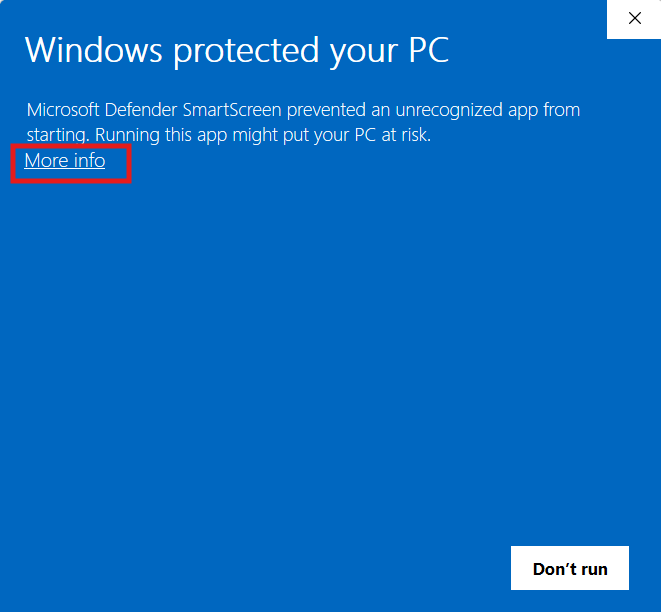
- When you see a blue screen with the message "Windows protected your PC," do not be alarmed. This is a security prompt from Windows Defender SmartScreen to verify the source of the application.
- Click More info to reveal additional options. This will display details about the publisher and provide further choices for proceeding.

- A Run anyway button will appear below the warning message. Click this button to continue with the setup.
- Ensure that you are installing software from a trusted source to avoid security risks. If the publisher is unknown or not verified, proceed with caution.
- If you frequently install applications from the same trusted source, consider adjusting Windows security settings to prevent repeated warnings.
STEP-2: Double click the file

STEP-3: Click next button

STEP-4: Click next button

STEP-5: Click Finish button

Dashboard app examples
When you launched the dashboard app the following screen will appear, in which you can select the lange and go through with take a tour. Curently Dashboard app Window supports English, Freanch, German, Spanish, Italian & Portuguese.

STEP-1: Connect with your Database
- Run the web folder in your browser. e.g. http://localhost/dashboardbuilder following welcome screen will appear.
- This is the main panel of the Dashboard app. This is a HTML5 based fully responsive interface built in PHP, HTML, JavaScript and CSS. The interface has a minimal design with a drag-and-drop feature that allows you to add multiple chart panel to customize the dashboard on according to the way you want.
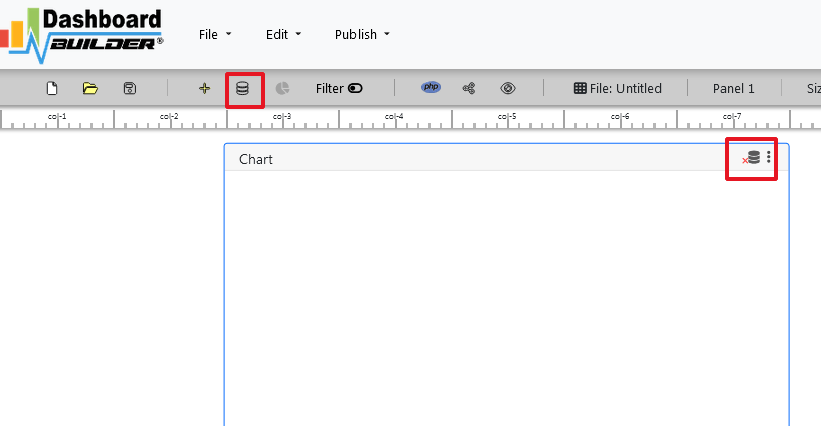
- Now Click the Database icon
- Following screen will appear. In our dashboard app example, we will use the sample SQLite database called Northwind.db to connect and fetch the data. Now, Select Database from data source tab. Select SQLite from the drop down list of Database, Enter your
"../data/Northwind.db"in the DB name field and Save changes as mentioned in the screen.
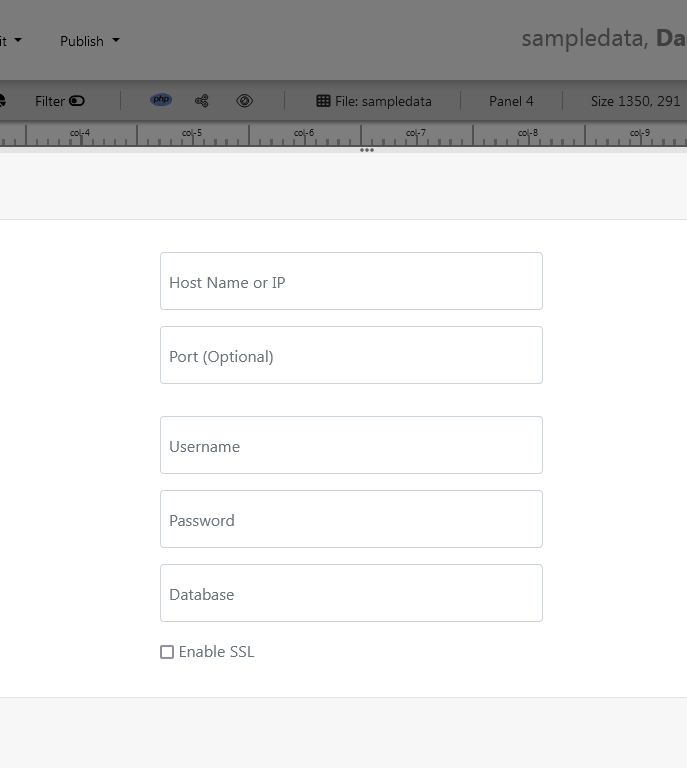
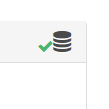
- When you click the save changes, a green tick mark with Database will appear that shows that your database is successfully connected.
STEP-2: Chart settings
- In our next step, we will fetch data from the database we have just connected. Select the gear icon for your Chart preference.
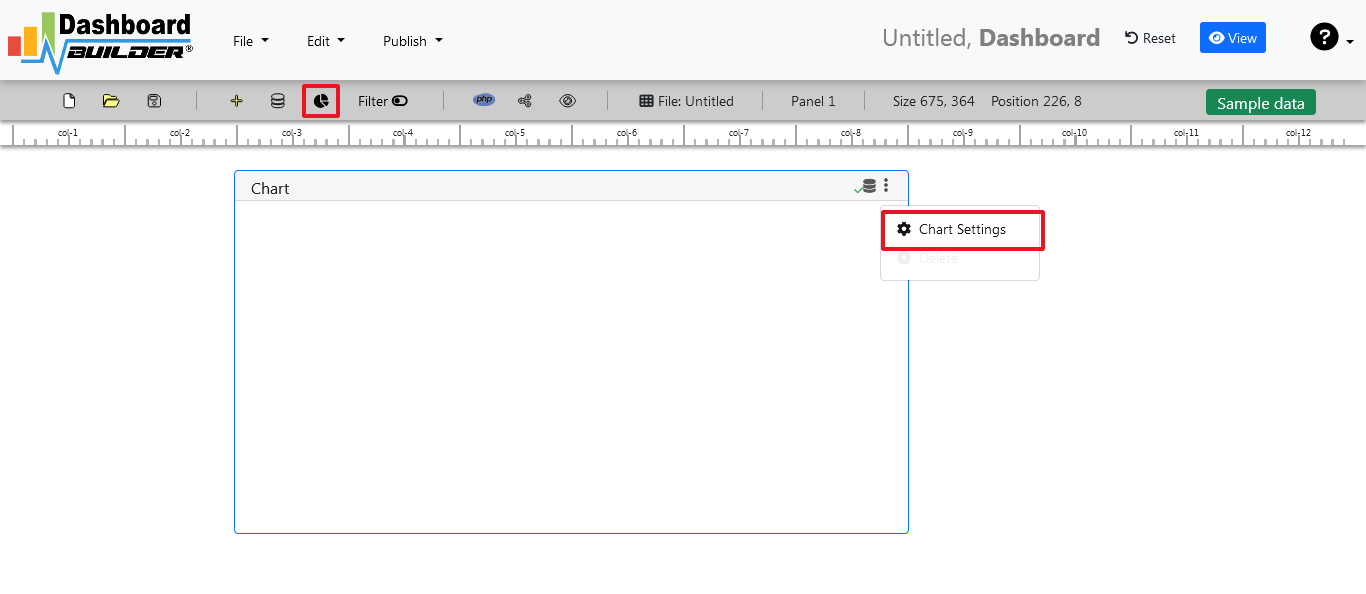
- The following screen will appear. List of the tables from Northwind.db will appear on the table list as shown in the picture below.

STEP-3: SQL statements
- In our example, we will be creating a simple Dashboard app for our sales management. This dashboard app will contain a chart where users can find the sales stats and maintain the data about the products.
- Now, enter the following SQL statement in text box in a following manner
SELECT strftime('%Y-%m',o.shippeddate) as xaxis, sum(d.quantity) as yaxis from `order details` d, orders o where o.orderid = d.orderid group by strftime('%Y-%m',o.orderdate) limit 50
- Now, we want to execute our query and fetch the data from the tables. Click the Run Query button
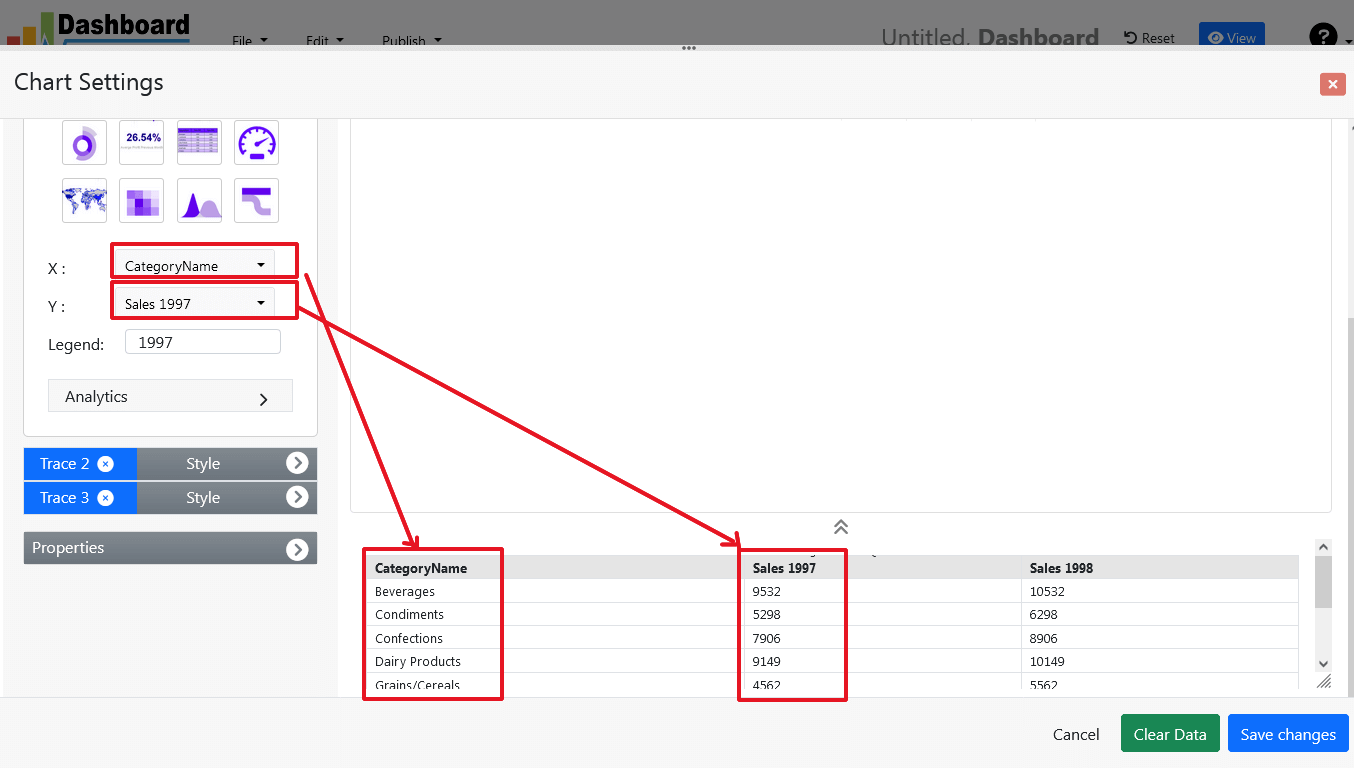
- Query Result will appear. Now, we have to assign x-axis data to the x-axis column and y-axis data to the y-axis column. Select your x-axis data from the drop down list of X and y-axis data from the drop down list of Y .
- Click Save Changes
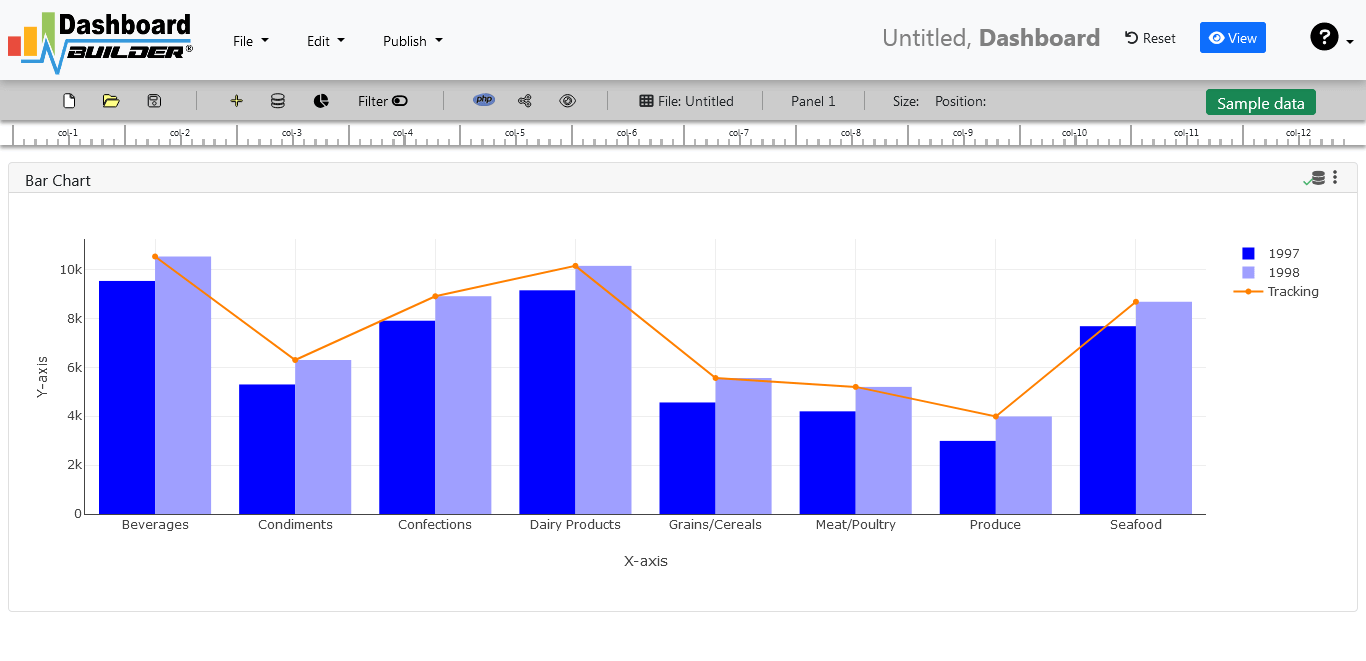
- Charts will be appeared on the screen as shown below.
STEP-4: Adjust the position
- You may adjust the size and the position of the Chart Panel by dragging its corner. The size and position are fully responsive according to the Bootstrap framework
STEP-5: Code generation
- So far we have successfully build our dashboard. In this step we are going to generate PHP source code for dashboard we have just created. Click the Generate button to auto-generate PHP source code for our dashboard

- PHP code for the chart will automatically generate, you may copy past this code to your Dashboard app.
Auto-generated PHP source code
Following is an example of auto-generated PHP source code. You may copy & paste the following PHP source code in your web application.
/**
 * DashboardBuilder
 *
 * @author Diginix Technologies www.diginixtech.com
 * Support  - http://www.dashboardbuilder.net
 * @copyright (C) 2018 Dashboardbuilder.net
 * @version 2.1.5
 * @license: license.txt
 */

include("inc/dashboard_dist.php");  // copy this file to inc folder


// for chart #1
$data = new dashboardbuilder();
$data->type =  "line";

$data->source =  "Database";
$data->rdbms =  "sqlite";
$data->servername =  "";
$data->username =  "";
$data->password =  "";
$data->dbname =  "data\Northwind.db";
$data->xaxisSQL[0]=  "SELECT strftime(^%Y-%m^,o.shippeddate) as xaxis, sum(d.quantity) as yaxis from `order details` d, orders o  where o.orderid = d.orderid group by strftime(^%Y-%m^,o.orderdate) limit 50";
$data->xaxisCol[0]=  "xaxis";
$data->yaxisSQL[0]=  "SELECT strftime(^%Y-%m^,o.shippeddate) as xaxis, sum(d.quantity) as yaxis from `order details` d, orders o  where o.orderid = d.orderid group by strftime(^%Y-%m^,o.orderdate) limit 50";
$data->yaxisCol[0]=  "yaxis";
$data->name = "linechart";
$data->title = "Line Chart";
$data->orientation = "";
$data->xaxistitle = "x-axis title";
$data->yaxistitle = "y-axis title";
$data->showgrid = "";
$data->showline = "";
$data->height = "167";
$data->width = "";
$data->col = "0";
$result[0] = $data->result();

?>

<!DOCTYPE html>
<html>
<head>
	<script src="assets/js/dashboard.min.js"></script> <!-- copy this file to assets/js folder -->
	<link rel="stylesheet" href="//maxcdn.bootstrapcdn.com/bootstrap/3.2.0/css/bootstrap.min.css"> <!-- Bootstrap CSS file, change the path accordingly -->

<style>
@media screen and (min-width: 960px) {
.id0 {position:absolute;margin-top:67px;}

}
.panel-heading {line-height:0.7em;}
#kpi {font-size:34px; font-weight:bold;text-align:center;}
#kpi_legand {font-size:11px; color:#999;text-align:center;}
</style>


</head>
<body>

<div class="container-fluid main-container">
<div class="col-md-12 col-lg-12 col-xs-12">
<div class="row">
<div class="col-md-4 col-lg-4 col-md-offset-4 col-lg-offset-4 col-xs-12 id0">
<div class="panel panel-default">
<div class="panel-heading">Line Chart</div>
    <div class="panel-body">
        <?php echo $result[0];?>
    </div>
</div>
</div>
</div>
</div>
</div>
</body>
This auto-generated PHP code is under MIT license, which you may customize as per your desire needs and can be used an anywhere you want. You can find the complete information about the license here
Conclusion
Now we have a PHP based dashboard that can be used with any web application that was customized to fit the requirements of the web design. The project also offers free and paid plans. You can also download Dashboard app FREE version. The code for Dashboard app can be found on GitHub under this license
Best of all, with our Standard and Enterprise licenses include 100% source code, for you to enhance the functionality or incorporate Dashboard app into your web application or any PHP software solutions/products, analytics/data science/data warehouse enterprise systems or Joomla, Wordpress or Drupal sites.
All editions of our Dashboard app series are still fully functional, for sale and supported and provides increasing levels of support to address the queries of users and developers.
Our Dashboard app can also be implemented using an online API where you don’t have to mix with PHP code. The online API uses universal HTML code which can be used in any platform. The data will be added or retrieved from the database using the API. You may find more information about the Online Dashboard.
You may want to take a look at our complete documentation and video tours of the latest version along with a live tour of user interface and step by step instructions for performing key features.
An overview of the best business dashboard
Business dashboards are vital to various companies across the world. Learning how to make a business dashboard is important but one should know what a business dashboard actually is, a data management tool used by most of the biggest companies throughout the market. It helps the businesses to learn which of their strategies work and which don’t, which helps these corporations interact better with the targeted audience. The reason behind it is so important for most quick software firms is because it makes managing their data easier for them.
Business dashboards can be used in different ways by different corporations, the definition of a dashboard depends mainly on the part it plays in the company, it serves different purposes for different firms and the users know how to use their dashboard.

How to manage your business dashboard?
Business dashboards manage the data in easy-to-understand and simple ways which makes it so useful and convenient for the firms, the dashboard first visually tracks the key performances indicators which are commonly referred to as KPIs, then analyzes the KPIs and later displays them. KPIs are chosen by the user to line up to corporation’s aims, the user should calculate if the KPIs are meeting the aims of the firm or not, it is very important for KPIs to align the goals of the firm as only then the readings of the KPIs will be effective and helpful for the company, KPIs will help the company learn which of their strategies and plans are helping the company more than the others, this aids the firm in making better strategies similar to the ones that work better and to get rid of the ones that aren’t very effective and so the document will only include the information which can apply to their firm only.
Alongside KPIs are metrics and key data points, these three work together and keep track of the health of the business, section, or a process like KPIs, these are also malleable to reach certain needs of the department and firm. A dashboard connects to your files, attachments, services, and APIs, but it presents this information in the form of bar graphs, line charts, tables, and gauges. This is what makes the metrics just as important as the KPIs in a dashboard.
What do you need to create a good business dashboard?
A good business dashboard will also need decent data visualization, data visualization is very important for a dashboard as it is the only way through which the information can be read and understood after only looking at it once. Bar charts, alongside highlighted features and dates, are the most typical and the most commonly used features used to get the visual patterns that are needed. The structure also holds a really important role in a dashboard; it should be chosen very carefully, and it needs a lot of attention too. Some of the greatest examples of dashboards for data visualization include the Dashboard Builder.
The user is supposed to be able to make decisions and act upon the taken decisions via the information on the business dashboard. Thus, the dashboard must include the data that is needed to help the user in taking the steps it needs to take as it is one of the main purposes of the dashboard. The dashboard is there to make it more effortless for the user to read the performance of their or the business they are working for to compare the data easily and understand it. This is a much more effective way through which you can extract the insights that can be functional and exciting to keep the firm’s direction stable and balanced or make changes if needed by the company.
How important is a real-time data for your business dashboard
A dashboard should be embedded with the business software that can update in real-time as the data keeps changing and evolves quickly so software that is quick is very vital as it can keep the data always updated. The easiest and the most effective way to achieve this aim is to have analytics tools and software that has the ability to gather all the data automatically, it should also be in a format that is simple and easy to use for the person using it and also present it for the user in an automated dashboard. Some firms think of google analytics as a better option and choose to use it as their business dashboard solution.
A dashboard can give you a prestigious view of the data of your firm. But at the same time, it should also be able to let you dig deeper into the information if that is a need of the firm or the user. As sometimes the basic and the main information is not enough and more information is needed to have a better understanding of the statistics. For example, if a graph from the user’s dashboard tracks in real-time sales of the products. The dashboard should also be able to let the user dig deep to find out which of his products are selling better than others, in what places are they selling, and other relevant information that might be needed.
Choose the platform for your dashboard wisely.
In the past 5 years, mobile devices as laptops, tablets, and mobile phones have become necessities instead of luxuries. If you look at the statistics, from 2012, the use of mobile browsers has moved from 8% to 33% as desktop browser use falls from 92% to 66%. And from here it doesn’t go backward, the use of mobile browsers will keep on increasing as it is easily accessible from anywhere and more people are starting to use it. The business should keep this in mind and should make all the applications they make or implement adapt to all the platforms. so in this world where the use of mobile devices keeps dominating other devices, users are able to access their respective dashboards from anywhere they please and are easy at.
Customize the dashboard as per your desire.
When we are talking about dashboards, standard size doesn’t work. The data a dashboard needs to be used for varies from user to user, some users have the same data but they want it to be organized differently. Still, some businesses make fixed and standard dashboards for their users. This makes the user having to waste their time on making different variations of the same dashboard and get aggravated. This can be easily avoided by the firms if they just customizable dashboards, this will save the users a lot of time they will be able to spend on other useful causes as this dashboard will let the user choose how and which of the data he wants to display.
If you’re getting customizable dashboards the users are going to also need the ability to save a view for instant access later. For example, if a user wants a specific dashboard for every day of the week, rather than customizing a dashboard for every day every time, the user can easily just create a saved view for every day and then just access it whenever they want instead of experiencing the hassle of making one every time they need it.
Conclusion:
The main aim of a dashboard is to help the corporation in understanding how it can reach its goals better and these were the main must-haves of a dashboard that are essential for a functioning dashboard that you should know if you’re making your own business dashboard.