Why KPI Dashboard is so important?
KPI or Key Performance Indicators are as the name suggests, indicators of your performance. These are measurements of your progress towards goals that you set for yourself or your business. They provide an understanding of how for you are from your goal. Since, the KPI dashboards are quite minimal and to the point, the information present is quite exact. This helps business owners make informed decisions in a consumer-friendly way. It also allows them to notice trends and such and make changes accordingly without putting their business in jeopardy.
A KPI dashboard can also give business owners a starting off point which they can utilize to expand upon. For example, a specific decision in their business creating issues for them will be spotted in the KPI dashboard and they can use it to gauge whether or not they need further analysis on it or if they should just scratch the idea in its entirety.

What Makes Good KPI Dashboards?
The following three (03) key factors which help to make a good KPI dashboard.
- Customization and specification are key when it comes to a KPI dashboard. The information that you need should not only be to the point but also tailored to your business and the point which your business is at.
- The deadlines should be kept narrow and the areas chosen as indicators should depend on the timeline of the business. However, the deadlines should also be kept quite realistic. It should not be outrageously unattainable just because you want to make it possible.
- The KPI should also be in line with the goals of your business. A well-rounded and thought-out business is likely to have established strategies in the very beginning of their existence and thus, any further decisions should be made, keeping those strategies in mind. This will also ensure that your KPIs are coherent and interrelated.
Difference between KPI and Dashboard
Logistically speaking, there isn’t a difference between KPI and a dashboard per se, since dashboards consist of KPI. However, to look at it simply KPIs are performance indicators within the dashboard that dictate whether or not a decision is following through like you hoped, or if a certain strategy is playing out according to you. These indicators give the employees a basic run-through of statistics and numbers that can help deduce the kind of changes that are to be made.
When we talk about a dashboard, it is a database comprising of the required information. Combined together, a KPI dashboard is a visual display of the data that can be accessed on a day-to-day basis. Quick access to these critical indicators keeps a business running efficiently and smoothly without hiccups. Almost all businesses rely on these dashboards to keep them up and running.
How to Prepare KPI Dashboard
- Define your performance key indicators. These indicators should be customized and in line with the kind of business that you are running. A reliable definition of aligned KPIs is having targets that are specific and which will directly affect the outcome of your business. It is better to ask for input and then work from there.
- Consultations from stakeholders are a very important part of determining the KPIs that will be perfect for your business. If you invest time and effort talking to stakeholders and taking their requirements into account, you can save time in the long term. You might not have to waste money indulging in the wrong ideas, you’ll improve facets of your business that will bring about positive change in your company as a whole.
- Visually, the first aspect of your KPI dashboard that you should focus on is an effective design. Without an effective design, your dashboard will fall short and will not be able to impress many clients. Creating a prototype is the first step.
- The right dashboard software can reform the way your dashboard plays out in the general market and can most definitely be created through excel. You can change the dynamics later on.
- Creating your data visualizations before firing your dashboard up is a very important step that can not be skipped. Visuals are becoming a necessary part of any and all database because it consolidates the information into one section.
How to create KPI dashboard in Excel using the Dashboard Builder
The Dashboard Builder is advertised as a utility tool that can be used to help maneuver your data according to the needs of your company. You can use the software to create and alter various illustrations and images and incorporate them into the dashboard without being forced to know programming techniques. The software comes with certain features that can make it easier for a layman to learn how to make a KPI dashboard without investing a lot of time and money into the process. Subsequently, it also does not take too long to learn the works of the website.
Step 1: Importing the Data into Excel.
Before you begin organizing your data in the dashboard, you first have to import all the relevant data into Excel. You can choose to copy and paste all your data in Excel or use a software to set up a proper connection and then export. People often opt for a live data connector that will continue transferring your data as it comes into existence. This ensures efficacy and swiftness. You can use this software to connect your apps and make sure that your Excel sheet is updated in real-time.
Step 2: Setting up Your Dashboard File
The next step would be to arrange your data into your dashboard file. It is considered efficient to have two or three tabs opened in your Excel for raw data and the structured data in your dashboard. It saves you the time to go back and forth and look for the data. You can import all of the relevant data into the raw sheet.
Step 3: Import the Excel sheet to the Dashboard Builder.
Once all your raw data has been imported into the Excel sheet, you can proceed to use Dashboard Builder to insert illustrations and other dynamic features into your dashboard by importing all of the data into the Dashboard Builder. This can be done using the import file feature available on Dashboard Builder. Dashboard Builder makes use of its file import capabilities to fetch data from various locations and create a single source of data. The best part is that you need not download the software to be able to use this feature, you can even use it online dashboard for FREE as well.

Step 4: Composition of the Dashboard
Charts are an important element of a decent dashboard. The charts can be composed using the drag and drop tool on Dashboard Builder. Without knowing how to code and program your graphics, you can change their positions and sizes using this tool which has been programmed for your ease. The entire task can be performed on your web interface. This makes creating a dashboard easier for businesses that do not have experience with software development. You can look at the tool as if it was a KPI dashboard generator.

The KPI dashboard builder offers a variety in the types of charts. This includes the basics which are line, bar, pie, 3D, table, and a histogram. Apart from them, there is also donut, bubble, stack, and area which can be used to display data in an intricate and specific fashion. Sankey diagrams are often used by employees to concentrate information related to the contribution of flows. You can also make use of heatmap, choropleth map, and sunburst. You can reclaim the logistics of the chart and alter them according to you and the needs of your business. The KPI dashboard builder will help make your charts dynamic as compared to the options in charts that are available in Excel. You can edit within this KPI tool and insert the data into your dashboard.
Step 5: Analysis of Data
KPI Dashboard Builder will analyze the data and give an output that can allow you to have a better understanding of where changes need to be made. This can initially be done using the Pivot Table in Excel or through the Data Analytics tool in the KPI Dashboard Builder. The KPI Dashboard Builder is programmed to categorize your data efficiently and in a manner that will let you analyze your data using the tool. You can use the Pivot Table to determine which data needs to be analyzed and let the KPI Dashboard Builder takes care of the rest.
Step 6: Make Your Dashboard Responsive and Dynamic
Dashboard Builder is built on JavaScript and D3 which makes it user-friendly. The assimilation of HTML5, CSS, and SVG assists in including visuals on your dashboard making it interactive. Responsive charts are an excellent way to make your dashboard attractive and this can be obtained with the help of Dashboard Builder.
These dashboards are created to be able to adapt and alter themselves in line with the device that you are using whether it be your desktop or your mobile phone which allows you to access your data from anywhere you prefer because of the way KPI Dashboard Builder designs them.
The visualization features available on the KPI Dashboard Builder completely alter the outlook of your dashboard, giving it that extra flair.
Are you ready to try your hand at KPI business dashboard ? Try KPI Dashboard Builder free forever!
George Lewis, Digital Marketing @DashboardBuilder
JSON Dashboard an overview:
JSON dashboard is a lightweight data visualization tool that parses JSON data (REST API) and creates JSON dashboards with no line of code and any Expert Techniques or programming skills required.

What is JSON Dashboard Builder?
JSON Dashboard is a utility in dealing with JSON complex data, creates charts, graphs and dashboard and generates PHP code by adopting the best code generator algorithm.
Why JSON Dashboard?
JSON Dashboard is a drag-and-down, elementary-to-use, lightweight, and faster visualization tool that parses data from REST API JSON and displays dashboards in a graphic layout faster. JSON syntax is straightforward, providing easy parsing and faster data execution. Since JSON syntax is minimal and light-weighted, that’s why JSON Dashboard executes it in a faster way.
Creating an extremely impressive dashboard is a matter of minutes
In the following, we will create a JSON dashboard, but before we get started, we need to ensure that the following requirements are met.
Hardware and Software Requirements
There are no such extensive requirements to run the JSON Dashboard. The JSON dashboard was built by the pioneer dashboard builder firm. The JSON dashboard is a flimsy utility, built in an intelligible way and did not need massive requirements to run.
Pre-requisites
Before starting this tutorial, you should:
- PHP Version 7 or later
- Apache 2 or later
- JSON is enabled
There is no additional installation required to enable JSON to encode functions; JSON encode part of the PHP core
JSON Dashboard runs on all SVG-compatible browsers such as:
- Windows 7 or later /Linux 3 or later
- Firefox 52, Chrome 57, IE
- JSON Dashboard is available for downloading
Installation
There is a Free version of JSON dashboard available
- You can download the dashboard dashboard code fromDownload Dashboard Builder
- Place the files in a directory on the web server. e.g.
…/www/yoursite/dashbboardbuilder-v4-FREE/ - Unzip
 the file dashboard.zip using Extract Here option to the root folder of "dashboardbuilder"
 the file dashboard.zip using Extract Here option to the root folder of "dashboardbuilder"
TAKE ADVANTAGE OF THE LIGHTWEIGHT CONNECTIVITY WITH JSON
JSON syntax is very easy to use. It provides an easy parsing of the data with a faster execution time. The syntax is minimal and light-weighted, which helps JSON execute and respond faster. There is no additional requirement for a JSON dashboard. JSON encode is a part of the PHP core and comes enabled by default in all major web servers.
JSON dashboard visualization tool uses the Bootstrap CSS framework, D3.js library, and HTML5 to render a graph, displaying a responsive and dynamic quality graph.
A user can easily and precisely create an extremely impressive dashboard with the JSON dashboard visualization tool. It has a powerful code builder built-in, which requires no technical skill to create interactive dashboards for your business.
Easily fetch and visualize REST API JSON data with just a few clicks!
With the help of the following easy steps, you can fetch complex data from a JSON file or REST API and create the highest level of beautiful dashboards for professional businesses with zero coding and without programming skills in minutes.
- Retrieve JSON data through JSON dashboard
- Assign data to X and Y-axis column.
1. Retrieve JSON data through JSON dashboard
This section of the article helps you understand how to connect to JSON data. To proceed further, you need to make sure that you have already installed the dashboard builder tool and you meet all the prerequisites .
- STEP-1 Run the dashboard builder, if you are using on-prem version then run the dashboard builder in a browser
- STEP-2 Click the database icon
- STEP-3 On the File tab, enter the URL of your REST API or JSON file and hit the Save Changes button.
- STEP-4 Click the gear iconbutton to open the chart properties windows
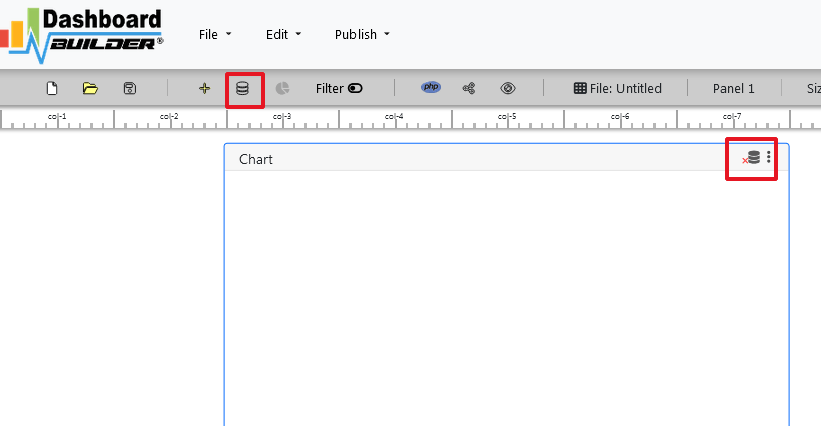

RETRIEVE COMPEX JSON DATA AND CREATE DYNAMIC & INTERACTIVE DASHBOARDS WITH OUR DASHBOARD BUILDER
You can create as many charts as you want for your dashboard by following the above steps. JSON dashboard doesn’t require any technical skill to fetch complex data from JSON to create a graph, chart, or dashboard. The dashboard builder has a powerful built-in engine, which connects to your JSON file in a few clicks and retrieves the data using innovative high-tech technology.
A sample JSON format
[ { "firstName": "Joe", "lastName": "Jackson", "gender": "male", "age": 28, "number": "7349282382" }, { "firstName": "James", "lastName": "Smith", "gender": "male", "age": 32, "number": "5678568567" }, { "firstName": "Emily", "lastName": "Jones", "gender": "female", "age": 24, "number": "456754675" } ]
Pick your columns to display in a graph
Once the data is retrieved, you may easily assign your data to the X and Y axis to display your desired chart. JSON dashboard has an easy-to-use, user-friendly, and powerful drag and drop utility with high-tech technology, in which you can resize and adjust the position of your graph according to your need.
Create your favorite chart with JSON dashboard
JSON dashboard comprises a huge range of all famous charts you love. It gives you a huge range to chart types to select.
JSON dashboard brings all famous charts together in one single place to trace and measure your business performance on each different measurement amazingly. Following are the 13 most popular chart types also available in the JSON dashboard:
- Line
- Bar
- Stack
- Area
Creates responsive graph and dashboards with this great JSON data visualization tool
JSON dashboard uses HTML5 and Bootstrap CSS framework. Hence, it has full capability to respond to the environment based on media's screen size, platform and orientation of your device.

The graphs generated through the JSON dashboard are fully responsive and fit any device you use. You can access your dashboard from anywhere, on any standard browser using any device such as a PC, tablet, or mobile phone.
Make your dynamic graph instantly
JSON dashboard uses D3.js JavaScript library to drive your graph dynamic. It updates the graph prosperity on click events. The graph updates automatically when a user clicks a trace, data legend, or selects a chart filter. The graph changes, the prosperity updates instantly, which leads to an update in the chart. .
Share your dashboard with your team
With JSON dashboard, you can publish and share your dashboard with your team using just one click. This great dashboard tool for JSON Dashboard generates the URL for your dashboard to share with your colleagues. Not only this, the JSON dashboard has a powerful PHP code generator plugin installed, which generates PHP code for your dashboard in just one click. This auto-generated PHP code for your dashboard is published under the MIT license, which you can customize as per your desired needs and can be used or embedded inside your PHP application.
Live and Dynamic Dashboard
Dynamic Dashboards are not only crucial and all-mandatory, but they also hold great beneficial convenience with the uncertainties that have drastically increased after your entrance at the C-suite.
Instead of frantically typing away at your keyboard, installing that raw data into something useable which is so slow and tedious to get out, you can now use Dynamic dashboards to your well-being, and this article will show you how!

What is Dynamic Dashboard?
The term is simply derived from the regular Dashboards present in your cars. It indicates where your business stands and visual figure of speeches, likewise the dashboards in your cars showing you how it’s doing, ie; speed, the temperature of its engine, the fuel level, etc. The only difference is that dynamic dashboards empower you to dig deeper into your data analysis. This means, it not only shows you the revenue getting a sudden and large move in the price of the asset, but it also lets you examine and figure out where the revenue is generating and coming to you from and pinpoint what it holds for your business in the coming future.
Why Dynamic Dashboard is a must-have?
We live in a world where every existing business specifies a swift and stiff come back to the changes made around them compulsory, or they will be lacking back. It may be possible but it is not likely to happen or probable to accurately respond to the needs of their customers on time using manual processes. The only way to keep up with the required decisions of your valued customers is through digital transformation and strategy. Dynamic Dashboards uses business analysis to do exactly that!
It shows you an eminently fair and admonished view on your business and can help you make supportive decisions and reaching conclusions.
More benefits of a Dynamic Dashboard
1. Visibility of the objectives and the progress made:
Upon starting a new enterprise, you’re filled with ardour and avidity, but it’s common for a human mind to not find it as riveting after a few weeks in, this actively demonstrates that frequent typical business days take over again, and the eye captivating purpose of the enterprise fade to the background and is not as enthusiastic anymore. The dynamic dashboard allows you to view the visibility of the objectives and everyone’s progress towards them on monitors situated deliberately around your offices
2. Helps drive ongoing refinements and improvements:
The dashboard makes the chart numbers that matter visible through its staggering activities, which has the same effect as showing a group of people a number on a chart, they will evidently influence with their actions, picking the highest number possible. That’s exactly how dashboards help drive ongoing refinements and improvements
3. Maximum productivity with minimum effect:
Dynamic Dashboard makes the data straightforward and more efficient for each user in the organization achieving maximum productivity with minimum effort
4. Fewer responsibilities for the administrators of the business:
The need of replicating dashboards is completely abolished which means the task is completed in a shorter period of time, therefore, streamlining and reducing the responsibilities of carrying out the administration of the business.
5. Allows to analyze the project in great depth::
One of the biggest benefits Dynamic Dashboards have is that they have got the ability to go to successively deeper levels of the hierarchically arranged database and the underlying data. If you wish to see the cause of an unexpected, minor deviation on your graph, click on the spot and bring up the data underneath. That way, you can analyze and examine the project or the task in further depth, making your work easier..
6. Dynamic dashboards have complete access to the underlying data:
You can always change what you see in the dashboard, if you need to. But only until you have set up the reports, graphs, and tables that you want to see. Dynamic dashboards are configurable. However, keeping a view on the projects over and over again, especially as to be fair and accurate lets you compare progress over time and estimate and measure different projects more easily.
7. The way of presenting the data is customizable:
Dynamic dashboards have a complete approach to access the underlying data and it has a simple and straightforward way of changing the way the data is presented. Everyone has different preferences and likings of the way they want to view their data. For example, you might wish to view your data in a long list of milestones, while your project sponsors might like to see them in a timeline.
Contemporary ways of reporting
To stay lucrative and ahead of the game, it is the main ability to withstand the force and the main predominant to make upstanding and reputable decisions and take the initial step whenever you feel you could use more information
To sum up, everything that has been clearly stated and identified so far, we have recognized how Dynamic Dashboards make your key business system and standards of measurements achieved without much difficulty and a lot of effort and easily understandable for everyone that they hand over the data and the accurate understanding as fast as you need them. You can make open-minded and strategic conclusions and resolutions without much considerations that will make your IT and business move forward and advance in position and progress resulting in your business forging ahead further more!
Are you ready to try your hand at Dynamic dashboard? Try Dynamic Dashboard Builder free forever!
George Lewis, Digital Marketing @DashboardBuilder
Real-Time Dashboards: Your Solution for Live Data Visualization
In today’s data-driven world, the ability to monitor and analyze live data is no longer a luxury—it’s a necessity. Real-time dashboards empower businesses by providing instant access to dynamic insights, enabling quick and informed decision-making. Whether you're tracking sales performance, monitoring website traffic, or visualizing operational metrics, real-time dashboards offer a seamless way to stay ahead. By consolidating data from multiple sources into an intuitive, interactive interface, they eliminate delays and ensure you’re always equipped with up-to-the-minute information. Embrace the future of live data visualization and transform your business operations with real-time dashboards.
What is a Real Time Dashboard?
A real-time is a kind of dashboard that automatically fetches the latest and most current data available with real time streaming and update dashboards in real time without reloading the entire page. As soon as a change is made to the data it reflects the dashboard immediately..

Overview
A real time dashboard is a dynamic dashboard that updates automatically after a certain interval. Whenever a change is made to a record it refreshes the dashboard dynamically with real time data to show the latest data set available.
The Dashboard Builder is a drag and drop, easy-to-use, browser-based visualization tool with real time streaming data set which lets you stream data and update dashboards in real time without reloading the entire page. Any visual or dashboard created in the Dashboard Builder can display and update real time data and visuals. The sources of streaming data can be a stock exchange, factory sensors, service usage metrics, or many other time-sensitive data collectors or transmitters.
The Dashboard Builder uses JSON as data source to read data set and stream it in real time. No data is stored by the service and the call is made from the web client directly.
Benefits of real time dashboards
A real time dashboard is a performance monitoring and analyzing tool used to track, and report on the company’s data in real time with the help of interactive and dynamic data visualizations. This real time data dashboard is automatically updated after a certain defined interval and provides instant vision to critical data.
Real Time Dashboard Examples
There are a variety of examples of the benefits of using real time dashboards and live dashboard examples in multiple industries.
Organizations especially operate in constantly changing dynamic environments, whether that means sales ebbs and flows, industry fluctuations, or the effect of certain news stories on the market, require constantly monitoring tool that helps them to identify emerging trends and monitor efficiency with real time data.
Following are the rich examples of the real time dashboard from numerous functions, industries, and platforms that can be used for your own dashboard building process, and generate actionable and real time insights.
1. Real time dashboards at Warehouse
The most promising use case of using a real time dashboard is deploying just-in-time inventory management. Companies that maintain minimal warehousing must constantly monitor their real time data for updates on current in-store levels, sales, and replenishing levels.

In the presents of real time dashboards, re-ordering has to arise quickly and efficiently to avoid surpluses or shortages. An inventory manager could centralize these figures to uncover Business Intelligence insights that might help by using a real time live dashboard. It could also help to set automatic re-supply triggers when certain products are running low or improve ordering by highlighting the demand for certain goods.
Bottlenecks in supply chains, over-ordering of products, or long hold times at other centers can mean damages to the business and losses in profits. Constantly monitoring productivity in real time enables to make quick decisions easier with greater confidence.
2. Real time dashboards at Couriers and Logistic companies
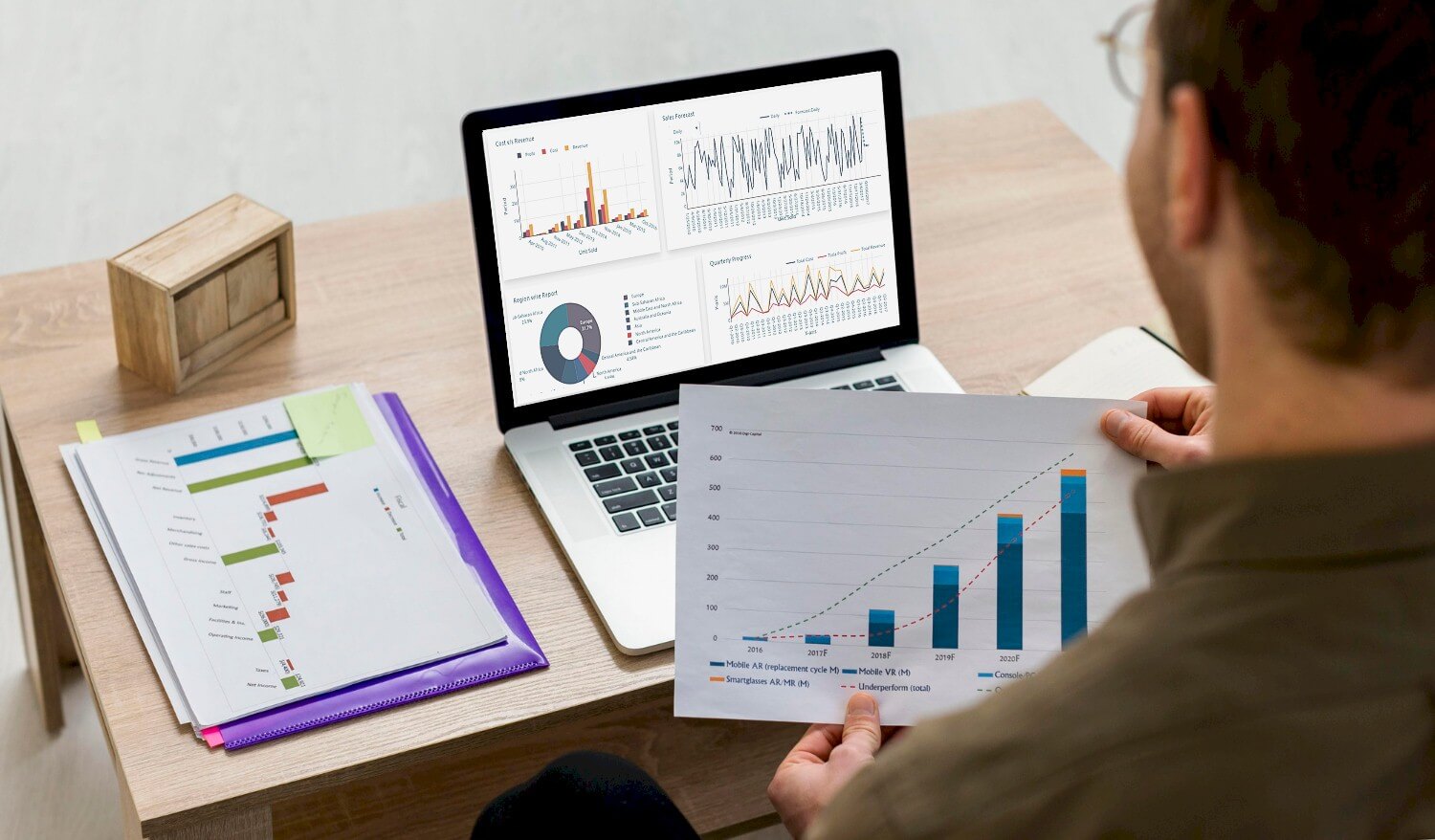
Another real time dashboard example is for couriers and logistic companies. Companies that handle shipping worldwide, require moving precise data from multiple sources to function smoothly. Data such as estimated delivery times, current locations, the status of the partial, outstanding orders, and more need to be monitored properly to avoid stick-ups and ensure deliveries arrive at the correct destination without any delay Real time dashboard lets users make quicker decisions about rerouting couriers, prioritizing orders, and streamlining their delivery process.
3. Real time dashboards at Brokerage and Securities, companies
One of the most common usages and benefits of real time dashboard examples is financial institutions such as investment banks, brokerage, securities, and exchange companies. Such companies require consistently observe the stock exchange rate from live data to make the right decision of trade for security bounds and market share at the right time.

In the new era of information technology, flux produces operational challenges that must always be closely monitored. Adding a real time dashboard lets executives and other non-technical users interpret the results and find ways to reduce costs easily by visualizing expenses and resource allocation in real time.
How to Create Real Time Dashboards
When you create a Real time dashboard, you get insights into your business health, pulling information from real time data to visualize trends and make visions easy to identify.
What You Need to Create a Real Time Dashboard?
To create a real time dashboard, you need the dashboard builder a data visualizing tool for the real time dynamic dashboard. The dashboard builder has the ability to fetch data from JSON, and a way to visualize it in real time without coding.
Once you have your JSON file in one place, you need the ability to fetch the data you need using the Dashboard Builder. With the help of the dashboard builder you don’t need to know SQL to fetch data, just use our SQL query tool, which allows you to query data without code.
In the next phase, you need a way to visualize your results with live data. To create a real time dashboard, you need to export your SQL data into JSON. How to fetch SQL data into a JSON file, take a look at this article. Alternatively, you can export your query result from MySQL as a CSV and plug it into Google Data Studio or Excel.
Requirements
There are very easily attainable requirements to run Real Time Dashboard. The real time dashboard was built by the pioneer dashboard builder firm, a kind of flimsy utility, which was built in an intelligible way and does need minimal requirements to run.
Pre-requisites
Before starting this tutorial, you should:
- PHP Version 7 or later
- Apache 2 or later
- JSON is enabled
Take a look at this how to guide If you are using a desktop version of the Dashboard Builder in MS Windows.
Real time Dashboard runs on all SVG-compatible browsers such as:
- Windows 7 or later /Linux 3 or later
- Firefox 52, Chrome 57, IE
- Real time Dashboard Builder is available for downloading
Installation
There is a Free version of the real time dashboard builder also available
- You can download the dashboard dashboard code fromDownload Dashboard Builder
- Place the files in a directory on the web server. e.g.
…/www/yoursite/dashbboardbuilder-v4-FREE/ - Unzip the file dashboard.zip using Extract Here option to the root folder of "dashboardbuilder"
Fetch your JSON data
With the help of the following easy steps, you can fetch complex data from a JSON file and create the highest level of extremely attractive dashboards for professional businesses with zero codings and without programming skills in a matter of minutes.
- Retrieve JSON data through JSON dashboard
- Assign data to X and Y-axis column.
Retrieve JSON data through JSON dashboard
This section of the article helps you to understand how to connect to JSON data. To proceed further, you need to make sure that you have already installed the dashboard builder tool and you meet all the prerequisites .
- STEP-1 Launch the dashboard builder, if you are using on-prem version then run the dashboard builder in a browser
- STEP-2 Click the database icon
- STEP-3 On the File tab, enter the URL of your JSON or API and hit the Save Changes button.
- STEP-4 Click the gear icon to open the chart properties windows
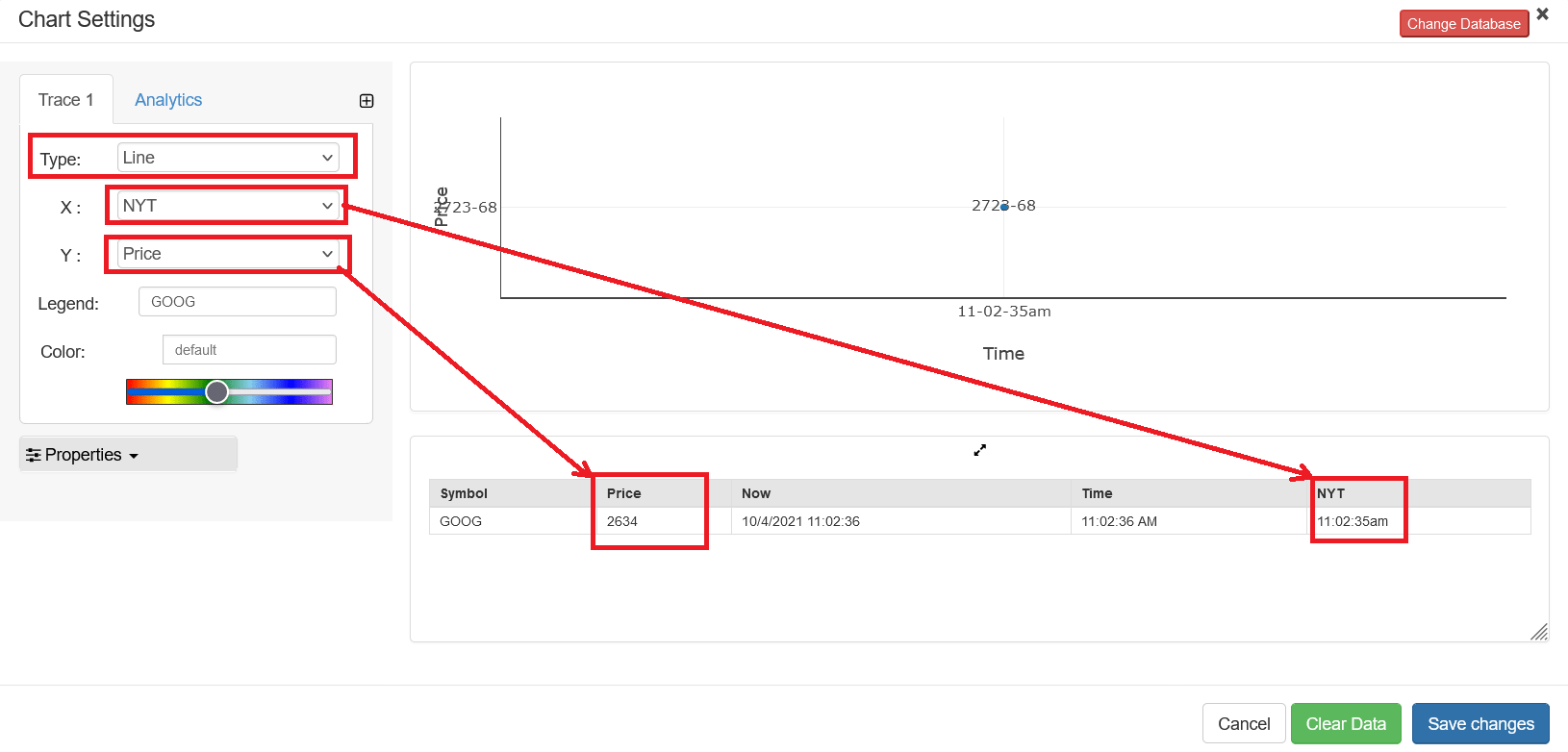
- STEP-5 On the next screen; select Line chart from the drop-down list of chart type. Select appropriate column for X-axis and Y-axis. In the below example we are using a GOOGLE Financial data, hence. NYT was chosen for X and Price was chosen for Y axis.
- STEP-6 Now, click the Properties to extend the tab.
- STEP-7 Save your changes and your real time streaming dashboard is live. You have various options to publish your real time dashboard.
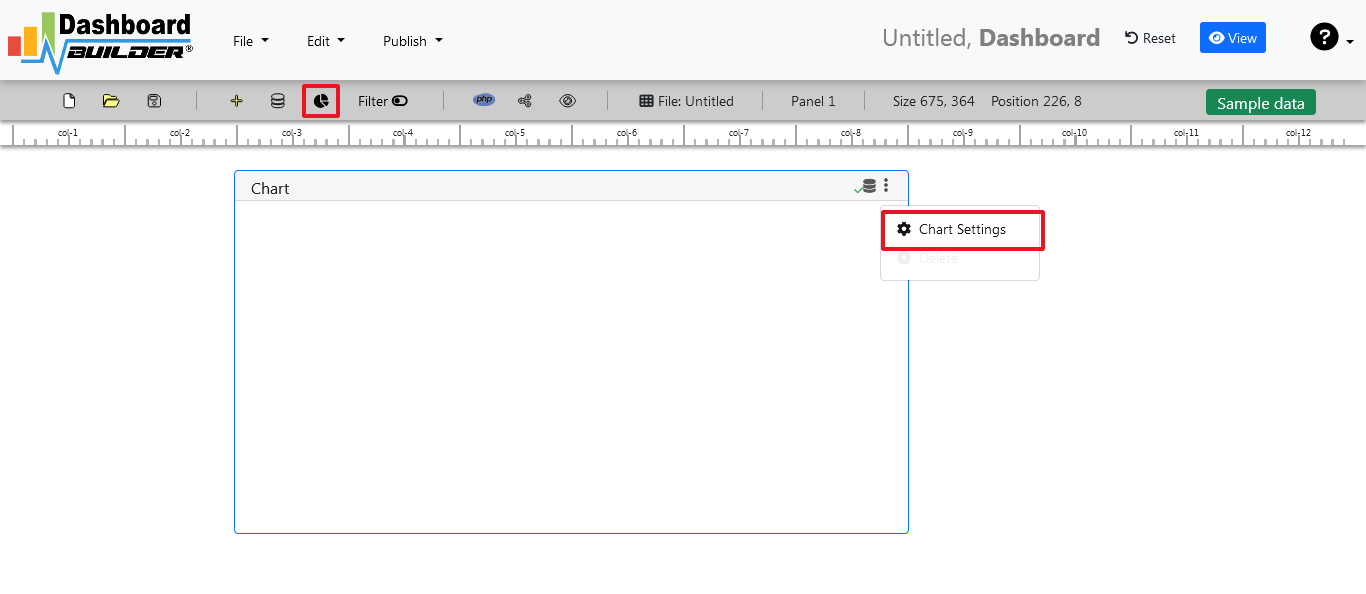

You may notice there is a new option Refresh. This button only appears when a JSON file is being used as a data source.

You can set your desire interval to refresh the data. You can also turn your real time dashboard to a real time streaming dashboard, which lets you stream data and update the dashboard.
Share your real time dashboard with your team
You can publish and share your dashboard with your team using just one click. This great dashboard tool for the real time Dashboard generates the URL for your dashboard to share with your colleagues. Not only this, the dashboard builder has a powerful PHP code generator plugin installed, which generates PHP code for your dashboard in just one click. This auto-generated PHP code for your dashboard is published under the MIT license, which you can customize as per your desired needs and can be used or embedded inside of your PHP application.
Dashboard examples overview
These great tips and expert techniques given in the examples can be used to create your dashboard in a remarkably and simple way to facilitate you with a great rich filter control to track and monitor your key performance indicators and improve the visualization of your business metrics in a simple way.

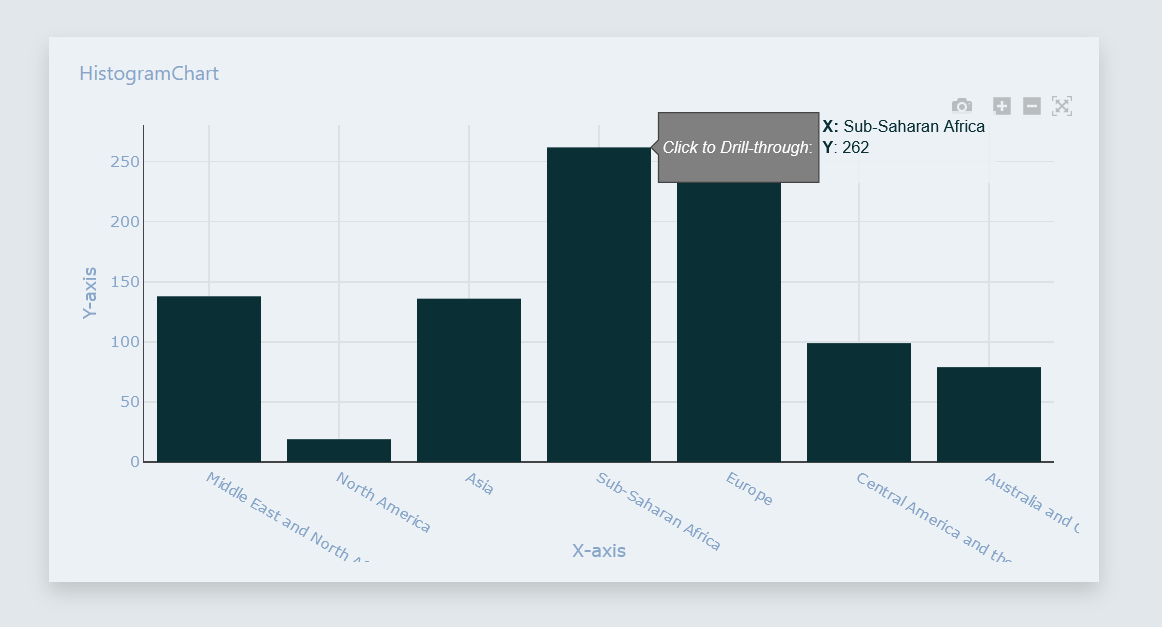
Drill Through Dashboard
A Drill through dashboard is designed to provide deeper insights for users who need to explore data at a granular level. This dynamic tool allows users to start with a high-level summary and seamlessly navigate into more detailed reports, uncovering specific trends and patterns. With its interactive features, it empowers decision-makers to investigate underlying data points, ensuring thorough analysis and informed decision-making
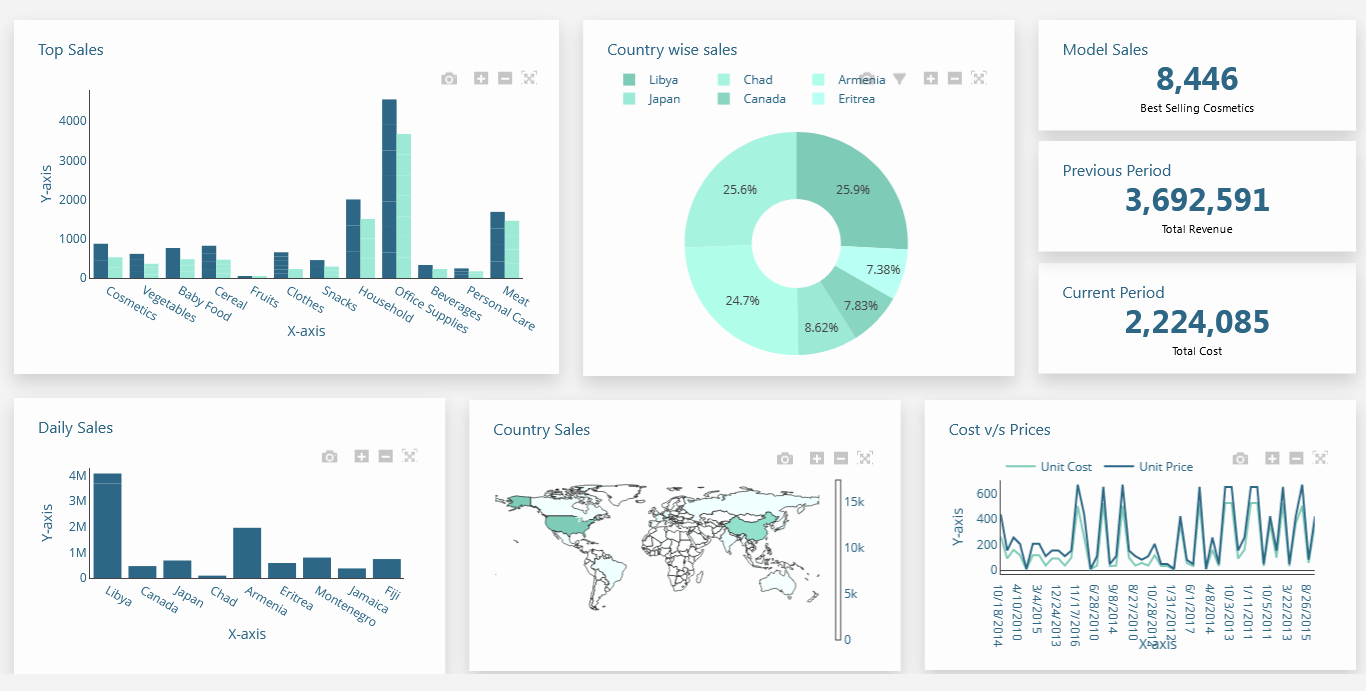
Business Dashboard
A business dashboard is a type of dashboard which summarizes information and simplifies complex data set into an easy intelligible view to the decision-makers.

Sales Dashboard
A Sales Dashboard facilitates the sale leaders to track their opportunity in the pipeline to win more businesses.
Supply Chain Dashboard
With the help of supply chain dashboard the logistic and warehouse operations can track their supply chain in real-time inventory levels in a single display.
