Dashboard performance indicators - a comprehensive guide to performance indicators Dashboard
How to create your Performance Indicators Dashboard?
Regardless of size, every business has certain processes or metrics that it needs to track. Without measuring this data, business rely on guesswork. The Dashboard Performance Indicator is a great tool to translate this data into charts and graphs that reflect the performance of your business. But how to start? What is an efficiency rate? How to create a performance indicator dashboard?
This article provides an overview of performance indicator dashboards. It contains valuable information and examples for both beginners and seasoned professionals.
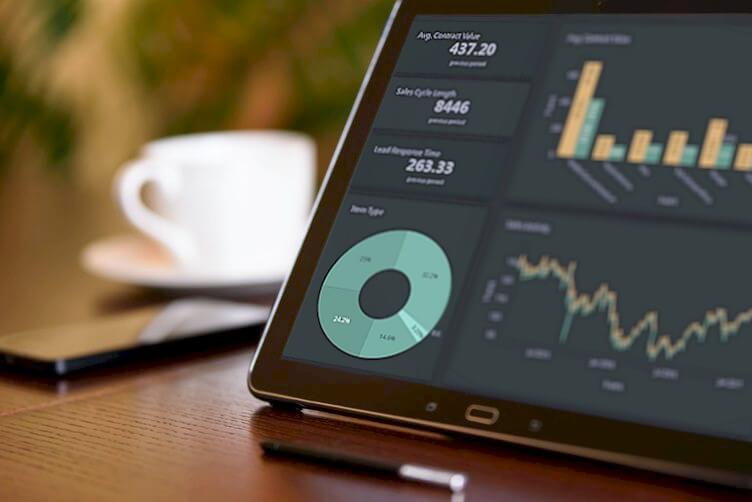
What is a Performance Indicator dashboards and why you need one?
The performance indicators dashboard is a commonly used indicator of performance against strategic goals. Dashboard performance indicators help reduce the complexity associated with performance monitoring by reducing the multidimensionality of the actual number of performance indicators.
Performance indicator dashboards are often used in organizations to track the operational performance of departments, programs or individuals against goals or objectives. They provide managers with tools to obtain information and make decisions.
The most important benefits we summarized for you, are listed below:
1. SPI Dashboard
SPI Dashboards (Strategic Performance Indicator Dashboards) typically reflect the health of the business and track performance against future business goals, such as expansion, development, growth etc .
2. OPI Dashboard
OPI Dashboards (Operational Performance Indicator Dashboards) are usually associated with strategic performance indicators. However, they focus on core activities or areas such as product development, marketing or internal projects. This information is used to make daily management decisions.
3. IPI Dashboard
IPI Dashboard (Individual performance Indicator Dashboards) are used to measure how well an employee's skills are being used on the job. They are also used to provide managers with a tool to evaluate, in particular, how to manage salaries in departments such as sales.
Related:
How to build your Dashboard Performance Indicators
Creating performance indicator dashboards is a relatively simple process. Setting goals is the first step. Then find the best scale (also called frequency) to control. This basic structure then defines the goals or objectives and the source of the data.
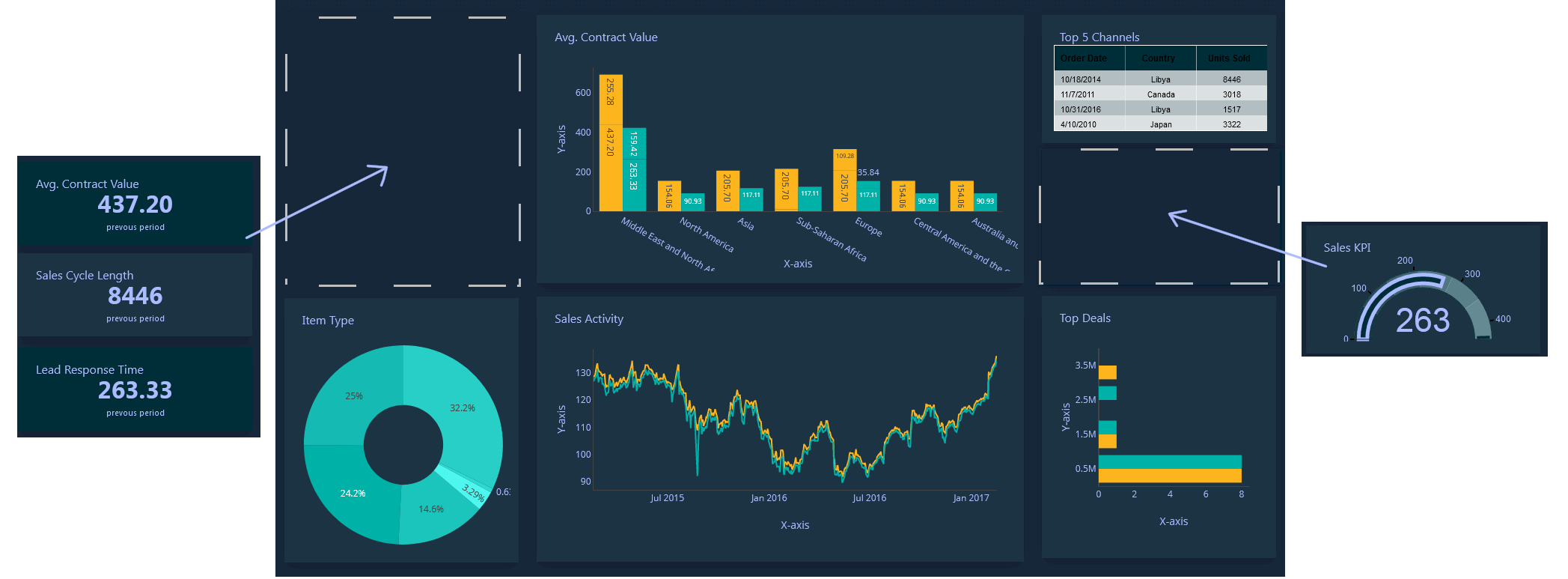
A Performance Indicator Dashboard should present your Performance Indicators and metrics in a concise and useful way for a specific purpose. It is a tool to provide information "at a glance" to the right audience to achieve goals and objectives.
But it can easily be overlooked when designing a dashboard. With so much data available from an ever-growing array of sources, how do you avoid unproductive dashboards and audience overload?
Here are some important points to consider:
- Keep it simple: Target a limited number of Performance Indicator dashboards on a single screen for a goal, project or department. Users can miss important information, trends and opportunities when data is hidden or "charts" are overloaded.
- Show trends over time: For charts or data to be truly useful, the information must provide context and history. This allows viewers to make decisions based on seasonal trends they may have missed.
- Telling a story: Like a graphic explanation, it is best understood when explained in the context of a story. Statistics showing the steps in completing the registration process can provide a clear path to follow.
- Avoid rainbow overload: Excessive color schemes can quickly make a dashboard unreadable. Stick to a simple color palette.
Revision, Fix and Repeat
As the business environment changes over time, organizations must adapt and adjust accordingly – and performance indicator dashboards are no different. It is a continuous cycle of revision, Fix and repetition.
Communication is key; Regular feedback from all areas of the business, including performance indicator dashboard owners and dashboard users, is critical. Frequent review tips are a great way to keep your dashboard from falling behind. A flexible dashboard, streamlined and working at its optimum, provides advantages such as:
- More competent processes.
- Management and strategic decisions can be made even faster.
- Bring attention to underlying problems before they become major problems.
- Removes dashboard bloat - (The common condition of performance indicator dashboards is becoming a control mechanism for almost everything.)
Some useful advice about the dashboard
Here are some tips and best practices for getting the most out of your dashboards.
The Performance Indicator Dashboard needs owners
If you have a dashboard of performance indicators, you will do well. Without owners, it is unclear who interprets the data, communicates the results and initiates the necessary actions.
Segment your Performance Indicator Dashboard by action
Group dashboards of performance Indicator and create individual dashboards targeted to specific audiences. Strategy dashboards visualize company growth and goals. Operational dashboards for daily activities such as sales departments. Analytics dashboards to analyze trends and research. Avoid trying to create a single dashboard for all these functions. Breaking them up gives the audience a single target to focus on.
Don't make it complicated
When it comes to designing performance indicator dashboards, less is more. Aim for no more than nine (09) views on one screen. Reduce the number of colors and use graphs of consistent size. For each chart, ask yourself if all historical data should be displayed if your audience only wants real-time data.
Use Vanity Metrics carefully
A useful performance indicator dashboard, such as the number of users who complete a particular stage of a registration process, provides information for making decisions that can improve performance. Vanity metrics, on the other hand, such as the number of website visitors are useful, but they are subject to fluctuations, manipulations, and don't tell the real story. Is this audience really interested in buying your product or service?
Avoid fancy widgets
There are many dashboard providers competing for a unique selling proposition, so new and unique widgets appear almost daily. For example, "last time in Spain", image rotation tools or "last tweets" provide little or no useful and concrete information and only add to the confusion.
Regular Reviews and Correction
Like any business tool, they require regular inspection and maintenance in order to function at their best. The participation of Performance Indicator Dashboard owners in regular "optimization" reviews reduces the information load and increases productivity even more.
Set up your dashboard.
There is nothing when creating a fancy dashboard if it's limited to one person or hidden behind dozens of logins. The information received should be communicated to all interested parties involved in the process. Feel free to share your dashboard internally and externally and consider providing a feedback mechanism.
Combine metrics to create effective Performance Indicator Dashboard
Combining the metrics into a actionable Performance Indicator Dashboard provides guidance for actionable action. For example, dividing the number of subscriptions to a service by the number that completes a particular stage yields information that can help you change parts of the process that are not performing inferiority.
Accuracy of Data
Garbage in, Garbage out. It doesn't matter how good your dashboard design looks if your data is inaccurate. The Performance Indicator Dashboard doesn't have the right fuel to perform. If fairly practicable, check the reliability and accuracy of your data.
Implementing without measurements
Implementing the Performance Indicator Dashboard at an enterprise-wide can be difficult. Start small; even a single graph can provide some welcome insights, but it will actually remain unknown without measurements.
Are you ready to try your hand at Performance Indicator Dashboard ? Try Performance Indicator Dashboard !
Admin dashboard PHP overview
A PHP admin dashboard is a web-based interface that allows administrators to manage and monitor various aspects of a website, application or business. It provides a centralized location for performing tasks and viewing important information, such as website traffic, user accounts, and data analytics.
A PHP Admin dashboards are typically designed to be user-friendly and easy to navigate, making it easy for administrators to quickly find and access the information they need. Some of the technology used to create an admin dashboard include HTML, CSS, JavaScript and PHP and other web development frameworks.

Make your work easier with our Admin dashboard and generate complete PHP source code.
Our PHP admin dashboard includes a robust analytics system that provides real-time data and statistics on website traffic, user behavior, and other metrics. This information can be used to make informed decisions about the website or application, such as identifying areas that need improvement.
Making work easier with the PHP admin dashboard involves utilizing the various features and tools that are available within the dashboard, such as analytics, reporting, and settings, to perform tasks quickly and efficiently, and make informed decisions about the website or application. Here are a few ways to do this:
- Utilize analytics: Use the analytics features of the dashboard to view real-time data and statistics on website traffic, user behavior, and other metrics. This information can be used to identify areas that need improvement, and make informed decisions about the website or application.
- Use reporting features: Use the reporting features of the dashboard to generate reports on various aspects of the website or application, such as sales, website traffic, and user activity. This will help track progress and measure the success of various initiatives.
- Streamline user management: Use the user management features of the dashboard to easily add, edit, and delete user accounts, and manage user permissions and roles. This will save time and reduce the need for manual processes.
- Customize settings: Use the settings features of the dashboard to configure various settings for the dashboard, charts and reports, such as color settings, font size and color settings, and background color settings. This will ensure that the dashboard or chart is running optimally and nicely.
Benefit of PHP Admin dashboard
One of the key benefits of using a PHP admin dashboard is that it allows administrators to perform tasks quickly and efficiently. For example, if an administrator needs to view a new user to the system, they can simply log into the dashboard and complete the task in a matter of minutes. This eliminates the need for manual processes, such as sending emails or making phone calls, which can save a significant amount of time and resources.
Another benefit of a PHP admin dashboard is that it can provide real-time information and analytics. This can help administrators make informed decisions about the website or application they are managing. For example, a dashboard might display the number of visitors to a website, the number of pages viewed, and the number of conversions.
How to create a PHP admin dashboard?
To create a PHP admin dashboard, developers typically use a variety of tools and technologies, such as PHP, HTML, CSS, and JavaScript. These technologies allow developers to create a user-friendly interface that is easy to navigate and understand.
the PHP Dashboard provide built-in support for creating admin dashboards, which can make the development process faster and more efficient. The PHP dashboard is a powerful tool that can help building, administrators manage and monitor a dashboard quickly and efficiently. It provides real-time information and analytics, and can be created using a variety of charts and reports. With the help of PHP Dashboard the Admin Dashboard will be much more efficient and easy.
How to code admin dashboard in PHP?
In our PHP Admin Dashboard example, we will develop Admin Dashboard PHP and link it to a MySQL database, fetch data, and create a dynamic dashboard using a drag and drop interface, before generating Dashboard PHP source code for our web application. We will demonstrate this using our freely released, open-source drag-and-drop Dashboard Builder. The following are the prerequisites for installing and running the PHP Dashboard..
Prerequisites
PHP Admin Dashboard framework can be installed on any platform, including Windows, Linux, and Ubuntu, as well as any platform that supports Apache, Nginx, and other web servers.
- PHP Version 7.2 or later
- Apache 2 or later
- Windows 7 or later /Linux 3 or later
- Firefox 52, Chrome 57, IE 8
Installation
There is a free trial version of PHP Dashboard.. available.
- You can download PHP Dashboard.. code from Download Dashboard Builder
- Place the files in a directory on the web server. e.g.
…/www/yoursite/dashbboardbuilder-v3-FREE/ - Unzip
 the file dashboard.php using Extract Here option to the root folder of "dashboardbuilder"
 the file dashboard.php using Extract Here option to the root folder of "dashboardbuilder"
Admin PHP MySQL Dashboard Template FREE with examples
Our Admin dashboard PHP template makes use of the Bootstrap 5 framework, D3.js, and HTML5, providing you with a completely responsive and dynamic dashboard. With this awesome PHP dashboard tool, you can quickly produce source code for your PHP application and develop interactive database-driven HTML, Bootstrap 5 and D3.js-based dynamic dashboards. The Admin dashboards PHP built with this fantastic tool are totally responsive and adaptable to any device. You may view your dashboards at any time and from any device, such as a PC, tablet, or mobile phone, using any standard browser.
Admin Dashboard PHP tutorial
How to build an attractive Admin Dashboard in PHP in minutes?
Before we begin learning how to develop a dynamic dashboard in Admin dashboard PHP and connect it to a database to retrieve data, we must first ensure that our PHP server (such as Apache, Nginx, or others) is configured to display files in the dashboard folder. chmod -R 777 dashbboardbuilder-v3-FREE gives read-write access to dashboardbuilder's folders and subfolders. Check your browser inspector/console to ensure that no errors are being detected and that all Dashboard Builder files are correctly loaded. We shall examine how to develop a dashboard in PHP step by step in the following phases.
- Connect to the MySQL database
- Enter SQL Query statement
- Select X and Y axis
- Changes to your chart
- Create the source code for the PHP dashboard.
STEP-1: Connect to the MySQL database
- In your browser, open the web folder. http://localhost/dashboardbuilder
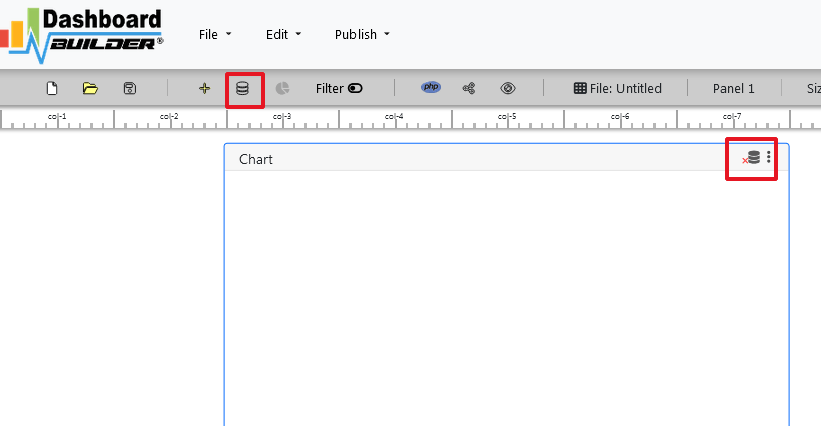
- The main panel of the PHP Dashboard is depicted in the above image. This tool is an HTML5-based fully responsive interface built with the most widely used PHP, HTML, JavaScript, Bootstrap 5 framework, and a powerful D3.js chart engine. The interface is simple in design, with a drag-and-drop feature that allows users to add as many chart panels as they want to customize the dashboard.
- Now click the Database icon
- The screen below will appear. In our Admin dashboard PHP example, we will connect to PHP MySQL Admin Dashboard and retrieve data from a sample MySQL database. Select database from the data source page.Select MySQL from the database list, enter database credentials and Save changes as instructed on the screen.
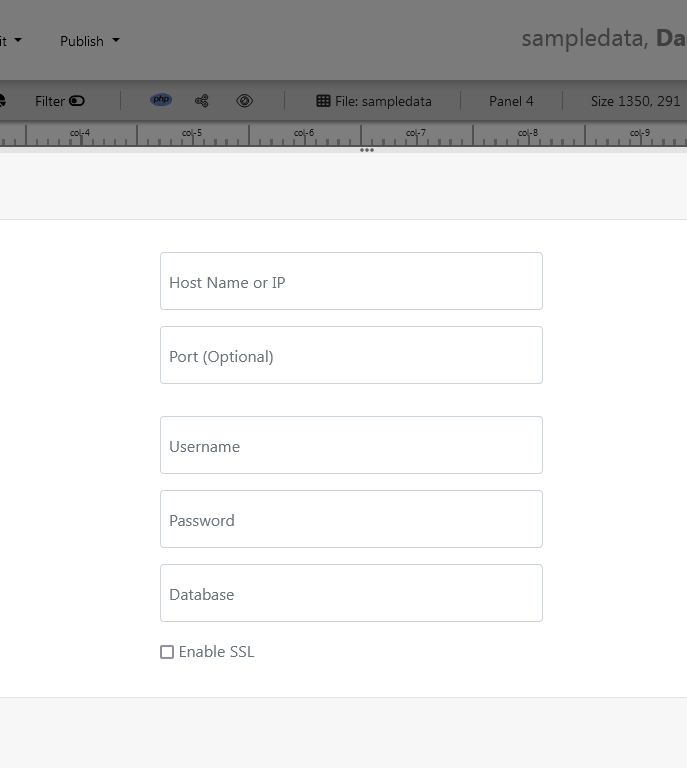
- When you click the save changes button, a green tick mark with a database appears, indicating that your database has been successfully connected..
This fantastic Admin dashboard tool allows you to connect to a variety of database sources using PDO, an acronym for Data Objects and the most consistent way to access databases in PHP applications. As stated in the introduction, this fantastic Dashboard PHP MySQL Open Source supports all major databases, including MySQL, MS SQL, SQLite, PostgreSQL, Sybase, and Cuboid. However, if you have data in Google Sheets, Excel, or CSV files, this great PHP dashboard can also fetch data from these sources using the upload sub-tab, as shown in the image above.
STEP-2: Enter SQL Query statement
- After successfully connecting to the database, our next step will be to retrieve data from the database..
- Select the chart settings option.
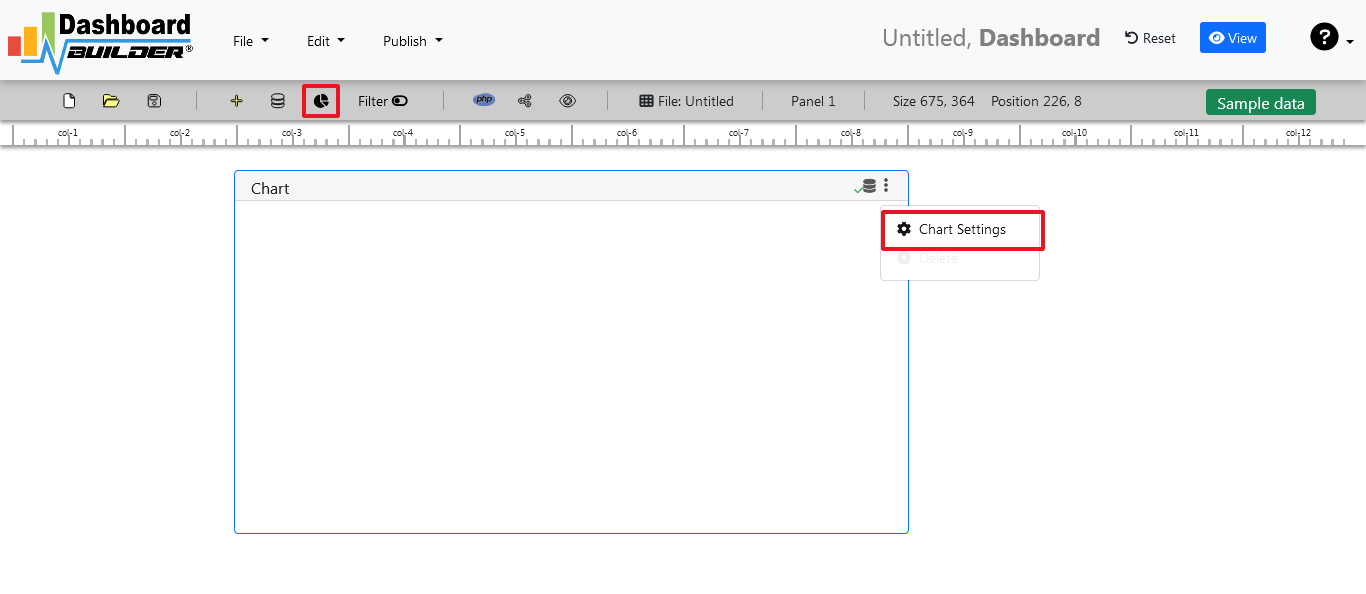
- As shown in the image below, a pop-up screen and a list of the tables will appear on the table list:

Our Admin dashboards include a powerful Query Builder and a smart SQL statement builder tool for quick and easy writing of complex SQL queries without the need for manual code writing, which is intended to simplify data retrieval from the database.
- When you click on a table, a default SQL statement appears in the SQL statement box, which you can alter as needed.
- You can use up to ten SQL statements at the same time to get data from various tables.
- In this example, we'll make a simple PHP application for sales management.This PHP dashboard will include a chart where customers may see sales statistics and keep product info.
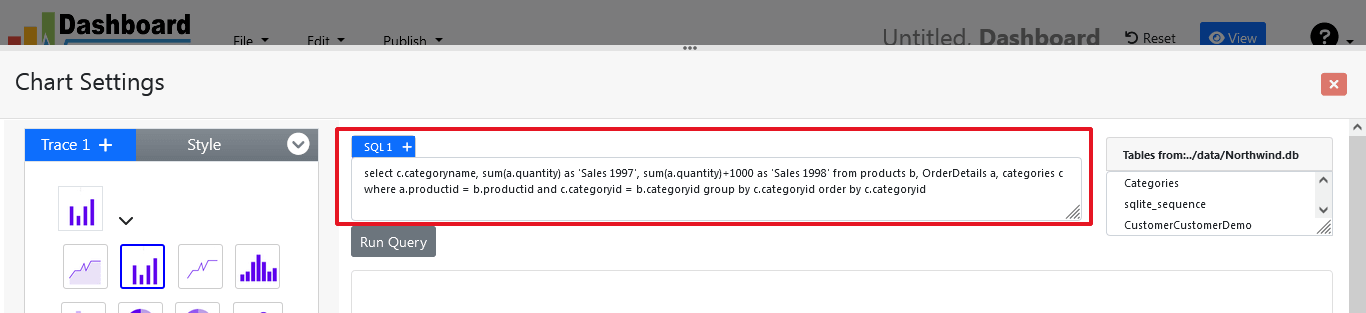
- Now, type the following SQL query in the text field in the format shown below.
SELECT strftime('%Y-%m',o.shippeddate) as xaxis, sum(d.quantity) as yaxis from `order details` d, orders o
where o.orderid = d.orderid group by strftime('%Y-%m',o.orderdate) limit 50
- Now we'll run our query and retrieve the data from the tables. Hit the Run Query button to execute the SQL query.
STEP-3: Select the X and Y axes
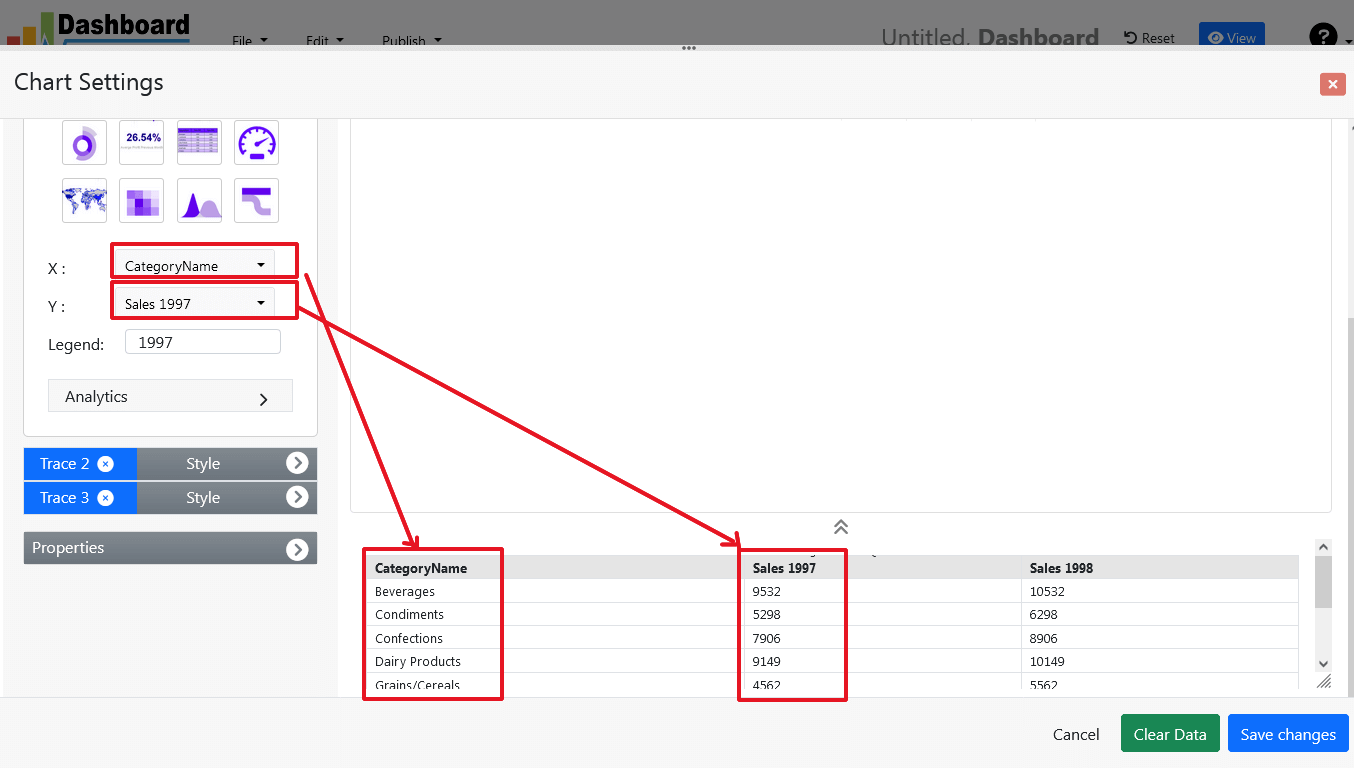
- The query result will be displayed. Now we must assign data from the x-axis to the x-axis column and data from the y-axis to the y-axis column. Choose your x-axis data from the X drop down list, and your y-axis data from the Y drop down list.
- Click the Save Changes button
- As illustrated below, charts will appear on the screen.
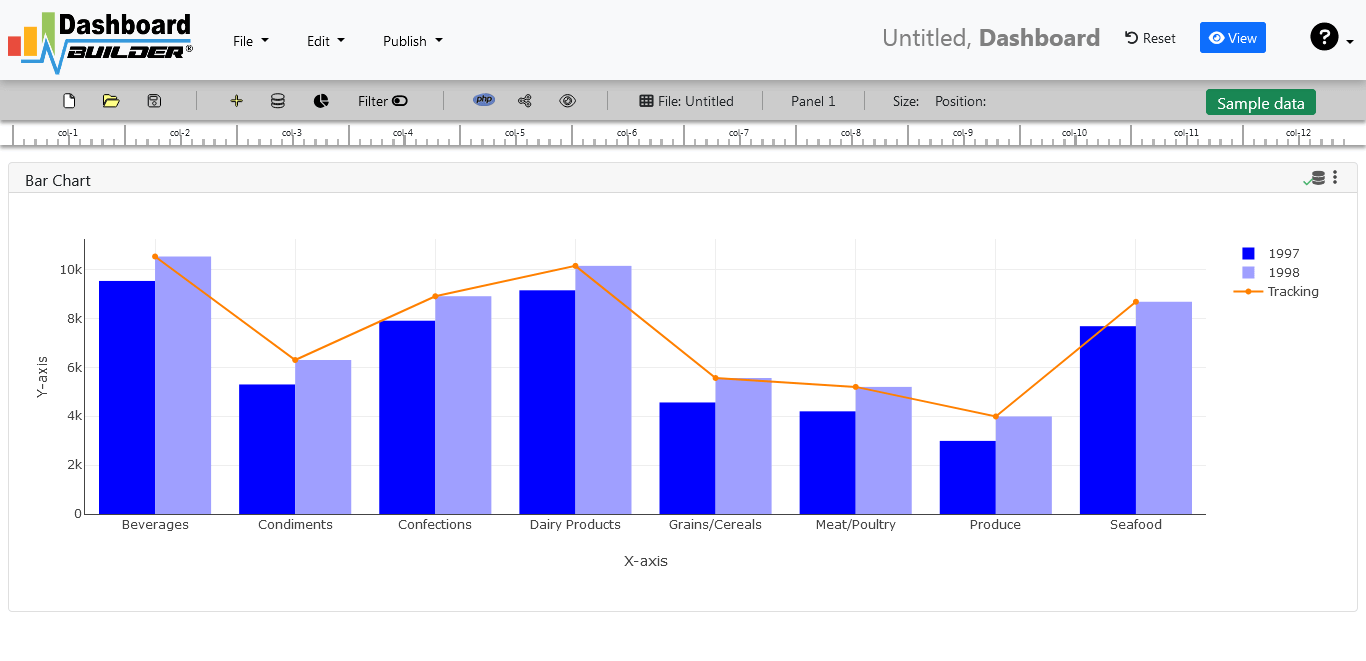
STEP-4: Changes to your chart
- By sliding the Chart Panel's corner, you can change its size and position. According to the Bootstrap framework, the size and position are entirely responsive.
STEP-5: Create the source code for the PHP dashboard
- So far, our dashboard has been built successfully. In this step, we will generate the admin dashboard source code that we just created. To create an admin dashboard source code for our PHP application, click the Create PHP code button.

- The admin dashboard source code for the chart will be generated automatically; you can copy and paste this dashboard PHP script into your PHP application.
Admin dashboard source code
PHP dashboard code example::
Admin Dashboard Open Source PHP
This auto-generated coding admin dashboard PHP source code is released under the MIT license and can be altered to meet your specific needs.The whole license information for admin dashboard code in PHP may be found here.
Conclusion
In conclusion, an admin dashboard is a powerful tool that allows website and application administrators to manage and monitor their systems more efficiently. It provides a centralized location for performing tasks, viewing important information, and making informed decisions about the website or application.
Our admin dashboard PHP is designed to be user-friendly and easy to navigate, making it simple for administrators to quickly find and access the information they need. With features such as user management, charts, analytics, reporting, and other settings, our admin dashboard streamlines the process of managing a website or application, saving time and resources.
By utilizing the features and tools available within an admin dashboard, administrators can perform tasks quickly and efficiently, make informed decisions about the website or application, and ensure that it is running optimally and securely.
Discover the Best Business Analytics Software for Smarter Decisions in 2025
In 2025, businesses are increasingly relying on advanced analytics software to make smarter, data-driven decisions. The best business analytics software empowers organizations to transform vast amounts of data into actionable insights, helping them to anticipate market trends, optimize operations, and drive strategic growth. These tools offer powerful features like predictive analytics, real-time data visualization, and seamless integration with various data sources, making them essential for staying competitive in today's fast-paced business environment. As companies continue to evolve, choosing the right analytics software becomes critical to unlocking the full potential of their data and making informed decisions that propel their success.

Dashboard Builder emerges as a leading solution in the realm of business analytics software, offering a comprehensive platform for creating dynamic, real-time dashboards that support smarter decision-making. Its intuitive drag-and-drop interface, combined with robust SQL query capabilities, allows users to effortlessly generate complex data visualizations without the need for coding expertise. Dashboard Builder's ability to integrate with a wide range of data sources, including MySQL, MS SQL, and Google Sheets, ensures that businesses can analyze data from multiple touchpoints seamlessly. Additionally, its real-time data streaming and predictive analytics features enable organizations to monitor key performance indicators (KPIs) and anticipate future outcomes, making it an indispensable tool for business analysts aiming to make data-driven decisions in 2025
Why Your Business Needs Analytics Software in 2025
The business landscape is more data-driven than ever before, making analytics software a critical asset for any organization aiming to stay competitive. With the vast amounts of data generated daily, businesses need advanced tools to analyze, interpret, and act on this information efficiently. Analytics software enables companies to uncover hidden patterns, predict future trends, and make informed decisions that drive growth and innovation. Whether it's optimizing operations, enhancing customer experiences, or identifying new market opportunities, the insights gained from analytics software empower businesses to respond swiftly to changes, minimize risks, and capitalize on emerging opportunities. In an era where data is the new currency, having the right analytics tools is essential for making smarter, more strategic decisions that ensure long-term success.
Key Features to Look for in Business Analytics Software
When selecting business analytics software, it’s crucial to choose a solution that offers comprehensive features to effectively transform data into actionable insights. Dashboard Builder exemplifies the essential capabilities that top-tier analytics software should provide:
- User-Friendly Interface: A key feature of Dashboard Builder is its intuitive drag-and-drop interface, allowing users to create dynamic dashboards without any coding knowledge. This ease of use ensures that teams can quickly visualize data and generate insights, streamlining the decision-making process.
- Real-Time Data Integration: Effective business analytics software should provide real-time data integration from multiple sources. Dashboard Builder excels in this area by seamlessly connecting with a wide range of databases, including MySQL, MS SQL, and Google Sheets. This enables businesses to monitor and respond to data as it updates, ensuring decisions are based on the most current information.
- Advanced Data Visualization: The ability to visualize data in meaningful ways is essential. Dashboard Builder offers a robust library of chart types and visualization options, including heatmaps, sunburst charts, and choropleth maps, allowing businesses to present complex data in a clear, accessible format that drives better understanding and insights.
- Predictive Analytics and Machine Learning: To anticipate future outcomes, business analytics software should include predictive analytics features. Dashboard Builder incorporates machine learning capabilities to analyze historical trends and generate forecasts, helping businesses make proactive, data-driven decisions that align with their strategic goals.
- Cross-Platform Accessibility: In today’s mobile-first world, the ability to access analytics software across different platforms is vital. Dashboard Builder is fully responsive and compatible with HTML5, allowing users to access their dashboards on any device, anywhere, anytime, ensuring they stay connected to their data insights on the go.
- User-Friendly Interface: The software should be easy to use, enabling team members at all levels to generate insights without requiring technical expertise. Dashboard Builder offers a highly intuitive drag-and-drop interface, allowing users to create dynamic dashboards quickly and efficiently. This simplicity ensures that your team can focus on analyzing data rather than struggling with complicated software.
- Comprehensive Data Integration: Your analytics software must integrate seamlessly with your existing data sources, including databases, spreadsheets, and cloud services. Dashboard Builder excels in this area by supporting a wide range of data sources such as MySQL, MS SQL, Google Sheets, and more. This capability ensures that your company can consolidate and analyze data from various platforms in one place, providing a comprehensive view of your business metrics.
- Customization and Flexibility: Every business has unique needs, so it’s important to choose software that offers robust customization options. Dashboard Builder allows you to tailor dashboards with a variety of chart types, layouts, and features, ensuring that the software adapts to your specific business requirements. Its ability to generate PHP and HTML code also provides flexibility in integrating these dashboards into your web applications or internal systems.
- Scalability and Adaptability: As your business grows, your analytics software should be able to scale with your needs. Dashboard Builder is designed to handle increasing data volumes and complexity, offering features like real-time data streaming and predictive analytics. This scalability ensures that the software can support your business as it evolves, making it a future-proof solution.
- Cost-Effectiveness: Budget considerations are crucial when selecting analytics software. Dashboard Builder offers competitive pricing plans that are designed to scale with your business. Its ease of use reduces the need for extensive training, and its robust integration capabilities minimize the need for additional IT resources, making it a cost-effective solution for businesses of all sizes.
- Real-Time Data Insights: In 2025, real-time data processing and analytics are no longer just a competitive advantage—they're a necessity. Businesses need to respond instantly to changing conditions, and Dashboard Builder's real-time data streaming capabilities make this possible. The software automatically updates dashboards as new data comes in, ensuring that your insights are always up-to-date, enabling swift decision-making based on the latest information.
- Predictive Analytics and Machine Learning: The future of business analytics lies in not just understanding what has happened, but in predicting what will happen next. Dashboard Builder incorporates advanced machine learning algorithms to perform predictive analytics, allowing businesses to forecast trends, anticipate customer behavior, and make proactive decisions. This trend is crucial for companies looking to stay ahead in a competitive market by using data to anticipate future challenges and opportunities.
- Enhanced Data Visualization: With the increasing complexity of data, clear and impactful visualization is more important than ever. Dashboard Builder offers a wide range of visualization options, including heatmaps, sunburst charts, and choropleth maps, to help businesses present complex data in an easily digestible format. These advanced visualizations allow companies to uncover patterns and insights that might otherwise be missed, making data more accessible and actionable for all stakeholders.
- Seamless Integration Across Platforms: In 2025, the ability to integrate analytics tools across various platforms and devices is critical. Dashboard Builder is fully responsive and compatible with HTML5, ensuring that dashboards can be accessed from any device, whether it's a desktop, tablet, or smartphone. Additionally, its capability to generate PHP and HTML code means that businesses can effortlessly embed dashboards into their existing web applications, ensuring seamless access to data insights from anywhere at any time.
- Multilingual and Global Accessibility: As businesses operate in increasingly global markets, the ability to cater to diverse audiences is essential. Dashboard Builder's multilingual support allows companies to create dashboards in multiple languages, ensuring that data insights are accessible and understandable to teams and stakeholders worldwide. This feature is particularly important for global businesses looking to standardize their analytics practices across different regions.
Choosing business analytics software with these features, like Dashboard Builder, ensures that your organization is equipped to harness the full potential of its data, leading to smarter decisions and sustained competitive advantage.
How to Choose the Right Business Analytics Software for Your Company
Choosing the right business analytics software is a pivotal decision that can influence how effectively your company utilizes data to drive growth and innovation. Here’s a guide on key criteria to consider, and how Dashboard Builder meets these essential requirements:
By focusing on these key criteria—ease of use, data integration, customization, scalability, and cost-effectiveness—you can select business analytics software that truly meets your company's needs. Dashboard Builder not only meets these requirements but exceeds them, providing a powerful, flexible, and user-friendly platform that empowers your business to make data-driven decisions confidently.
The Future of Business Analytics: Trends to Watch in 2025
As we move into 2024, the landscape of business analytics is evolving rapidly, with new trends shaping how companies extract value from their data. Dashboard Builder is at the forefront of these changes, offering features that align with the most significant trends in business analytics:
By embracing these trends—real-time insights, predictive analytics, advanced data visualization, seamless integration, and global accessibility—businesses can position themselves for success in 2025. Dashboard Builder is designed to meet these evolving needs, providing a powerful and flexible platform that empowers companies to harness the full potential of their data and drive smarter, more informed decisions.
Conclusion
As businesses navigate the complexities of 2025, discovering the best business analytics software is crucial for making smarter, data-driven decisions. Dashboard Builder stands out as a premier solution, offering a robust suite of features designed to meet the evolving needs of modern organizations. Its intuitive drag-and-drop interface simplifies the creation of dynamic dashboards, while its real-time data integration and predictive analytics capabilities empower businesses to stay ahead of trends and make proactive decisions. With comprehensive customization options, seamless integration across platforms, and multilingual support, Dashboard Builder ensures that companies can effectively manage and visualize their data, regardless of their size or geographic reach. By leveraging the powerful tools provided by Dashboard Builder, businesses can transform their data into actionable insights, driving strategic growth and maintaining a competitive edge in an increasingly data-driven world.
Explore the capabilities of our AI-Driven Data Analytics Tool! Test our AI-Driven Data Analytics Tool now.
Leveraging AI and Machine Learning in Dashboard Design
In today's data-driven world, the ability to harness and interpret vast amounts of data is crucial for making informed business decisions. AI and machine learning (ML) have become powerful allies in this quest, transforming how dashboards are designed and utilized. By integrating these advanced technologies, dashboards can provide deeper insights, more accurate predictions, and actionable recommendations, revolutionizing the way businesses operate.
In this article we will Explore how AI and machine learning are revolutionizing dashboard design in our data-driven world. Discover how these advanced technologies enhance data interpretation, providing deeper insights, accurate predictions, and actionable recommendations for informed business decisions.

The Evolution of Dashboard Design
Traditionally, dashboards have been static, displaying historical data and basic visualizations. While useful, these dashboards often require manual analysis to extract meaningful insights. The integration of AI and ML is changing this landscape, making dashboards more dynamic, interactive, and intelligent..
Benefits of AI and ML in Dashboard Design
The Dashboard Builder represents a paradigm shift in data analytics, offering a comprehensive solution that combines the power of artificial intelligence with intuitive visualization tools. By democratizing access to advanced analytics and empowering users with actionable insights, predictions, and recommendations, the dashboard unlocks new possibilities for innovation and success in today’s data-driven world.
Whether you're a data scientist, business leader, or decision-maker, the Dashboard Builder equips you with the tools and insights needed to navigate complexity, drive growth, and achieve your goals. Embrace the future of dashboard design with AI and machine learning, and transform your data into a powerful asset for strategic decision-making.
1. Intelligent Data Analysis
AI-Powered Observations: The Dashboard Builder transcends traditional data analysis by employing sophisticated natural language processing (NLP) algorithms. These algorithms process vast amounts of data to swiftly identify key insights, trends, and patterns. Users can gain a deeper understanding of their datasets without the need for manual exploration, facilitating quicker decision-making and strategic alignment.
Efficiency and Comprehensiveness: The dashboard analyzes both structured and unstructured data, such as customer reviews, social media posts, and emails, providing comprehensive insights. This integration reduces the time and effort required to derive meaningful insights from large datasets.
2. Predictive Modeling
Forecasting Future Trends: One of the most compelling features of the Dashboard Builder is its predictive analytics capability. By leveraging historical data and advanced machine learning algorithms, the dashboard can forecast future trends and outcomes with remarkable accuracy. This predictive power allows organizations to anticipate market shifts, customer behavior changes, and operational challenges..
Strategic Foresight: Whether it’s predicting sales trends, demand fluctuations, or resource allocation needs, the predictive analytics feature provides invaluable foresight. This helps organizations proactively adapt their strategies and stay ahead of the competition, ensuring they remain agile in a rapidly changing landscape..
3. Personalized Insights and Recommendations
Tailored to Unique Needs: The Dashboard Builder offers personalized recommendations tailored to the unique needs of each user. Drawing on its vast knowledge base and contextual understanding, the dashboard suggests specific strategies and interventions to optimize outcomes. For example, it can recommend targeted marketing initiatives or highlight areas for cost savings based on user-specific data analysis.
Actionable Suggestions: Beyond providing insights and predictions, the Dashboard Builder goes a step further by offering actionable recommendations for improvement. By analyzing the data and drawing on a vast knowledge base, the platform suggests specific strategies and interventions to optimize outcomes, driving tangible results and fostering continuous improvement.
4. Enhanced Decision-Making
Data-Driven Decisions: The insights generated by the Dashboard Builder empower decision-makers at all levels to make informed choices based on data-driven evidence. This mitigates risks and maximizes opportunities for success, ensuring that decisions are backed by comprehensive data analysis..
Real-Time Processing: With AI and ML, the dashboard can process and analyze data in real-time, providing up-to-the-minute insights. This capability is crucial for industries where timely decisions are essential, such as finance, healthcare, and logistics..
5. Seamless Integration and User Experience
Easy Integration: Integrating the ChatGPT API with Dashboard Builder is straightforward, enabling users to leverage advanced NLP capabilities to extract insights from textual data. The step-by-step guide simplifies the process, from API token creation to initiating and reviewing data analysis results.
User-Friendly Interface: The insights generated by ChatGPT API are seamlessly integrated into Dashboard Builder’s interface. Users can view analysis results in various formats, such as structured data, visualizations, or natural language summaries, depending on their preferences and requirements. This intuitive interface ensures that users can easily interact with and explore the data
How AI and ML Work in Dashboard Design Using the Dashboard Builder
Incorporating artificial intelligence (AI) and machine learning (ML) into dashboard design fundamentally transforms how organizations analyze and utilize their data. The Dashboard Builder exemplifies this integration, leveraging sophisticated AI and ML algorithms to provide comprehensive data analysis, predictions, and actionable insights. Here's a detailed look at how AI and ML work within the Dashboard Builder to enhance data-driven decision-making.
Integrating AI and ML into dashboard design through the Dashboard Builder offers a transformative approach to data analysis. By leveraging advanced NLP, predictive modeling, and personalized insights, the dashboard provides users with a powerful tool for making informed decisions based on comprehensive data analysis. Whether you're a data scientist, business leader, or decision-maker, the Dashboard Builder equips you with the tools and insights needed to navigate complexity, drive growth, and achieve your goals. Embrace the future of dashboard design with AI and ML, and unlock the full potential of your data.
Step-by-Step Functionality of AI and ML in the Dashboard Builder
1. Data Input and Processing
Textual Data Integration: Users can input various forms of textual data into the Dashboard Builder. This data can come from multiple sources such as customer reviews, social media posts, emails, and other text-based datasets relevant to the analysis.
Tokenization and Encoding: Once the data is input, the Dashboard Builder sends it to the ChatGPT API for processing. The API tokenizes the text, breaking it down into smaller units such as words or subwords. These units are then encoded into a numerical format that the AI model can analyze. This process is crucial for handling large and unstructured datasets, enabling the AI to understand and interpret the text accurately.
2. Intelligent Data Analysis
Natural Language Processing (NLP): At the core of the Dashboard Builder is advanced NLP, powered by OpenAI’s GPT (Generative Pre-trained Transformer) architecture. This deep learning model processes and generates human-like text based on the input data, allowing it to identify patterns, relationships, and key insights within the dataset.
Comprehensive Observations: By leveraging NLP algorithms, the Dashboard Builder can swiftly generate comprehensive observations from the data. It highlights trends, patterns, and anomalies, providing users with a deeper understanding of their datasets without requiring manual exploration. This facilitates quicker decision-making and strategic alignment.
3. Predictive Modeling
Regression Modeling: The Dashboard Builder uses regression modeling techniques to predict future outcomes based on historical data. For example, linear regression models can forecast sales growth by analyzing past sales data and identifying trends.
Least Squares Technique: The least squares regression technique is employed to find the line of best fit for the given data. This method minimizes the variance, or the sum of squares of the errors, to provide the most accurate predictions possible. By visualizing the relationship between data points, users can make informed predictions about future trends and events.
Predictive Analytics: The predictive analytics feature leverages historical data and ML algorithms to forecast future trends and outcomes. Whether it’s predicting sales trends, demand fluctuations, or resource allocation needs, this capability provides invaluable foresight. Organizations can anticipate market shifts, customer behavior changes, and operational challenges, allowing them to proactively adapt their strategies.
4. Personalized Insights and Recommendations
Contextual Understanding: Drawing on its vast knowledge base and contextual understanding, the Dashboard Builder offers personalized recommendations tailored to the unique needs of each user. This goes beyond providing raw data and insights to suggesting specific strategies and interventions to optimize outcomes.
Actionable Recommendations: The platform analyzes the data and suggests actionable recommendations for improvement. For example, it can identify inefficiencies in processes, recommend targeted marketing initiatives, or highlight areas for cost savings. These suggestions empower organizations to make data-driven decisions that drive tangible results and foster continuous improvement.
5. Integration and Visualization
Seamless Integration: The insights generated by the ChatGPT API are seamlessly integrated into the Dashboard Builder’s interface. Users can view the analysis results in various formats, such as structured data, visualizations, or natural language summaries. This ensures that the data is presented in a user-friendly manner, facilitating easy interpretation and exploration.
Interactive Dashboards: The Dashboard Builder allows users to create interactive dashboards that display the analyzed data in real-time. Users can customize the dashboard to suit their specific needs, ensuring that the most relevant insights are readily accessible. This interactive approach enhances the overall user experience, making it easier to navigate and utilize the data effectively.
6. Reviewing and Sharing Results
Data Analysis Reports: Once the analysis is complete, users can review the results provided by the ChatGPT API. The platform generates detailed data analysis reports, including graphs, tables, and natural language summaries. These reports highlight key observations, predictions, and actionable recommendations, providing a comprehensive overview of the analysis.
Saving and Sharing: Users can save the data analysis reports within the Dashboard Builder for future reference or sharing. The platform offers various sharing options, allowing users to distribute the reports to relevant stakeholders via email, link sharing, or other preferred methods. This ensures widespread access and visibility, facilitating collaborative decision-making.
Real-World Applications of AI-Driven Dashboards
Healthcare
In healthcare, AI-driven dashboards can predict patient outcomes, identify potential health risks, and recommend personalized treatment plans. For example, a hospital might use an AI dashboard to predict patient admission rates and optimize resource allocation.
Finance
Financial institutions leverage AI dashboards to monitor market trends, predict stock prices, and detect fraudulent activities. By analyzing real-time data, these dashboards provide traders and analysts with actionable insights to make informed investment decisions.
Retail
Retailers use AI-driven dashboards to analyze customer behavior, predict sales trends, and optimize inventory management. Personalized recommendations and targeted marketing campaigns can also be developed based on customer data analysis.
Manufacturing
In manufacturing, AI dashboards predict equipment failures, optimize production schedules, and improve supply chain management. By analyzing data from sensors and IoT devices, manufacturers can reduce downtime and enhance operational efficiency.
Conclusion
The integration of AI and machine learning into dashboard design through tools like the Dashboard Builder represents a significant advancement in data analytics and visualization. By harnessing these powerful technologies, businesses can transform raw data into actionable insights, enabling smarter decision-making and more strategic planning. Enhanced data analysis capabilities allow for comprehensive and intelligent examinations of trends, patterns, and anomalies that might be overlooked with traditional methods. Predictive modeling and regression techniques offer organizations the ability to forecast future trends with remarkable accuracy, giving them the foresight to anticipate changes and adapt strategies proactively..
AI-driven dashboards provide personalized insights and recommendations tailored to the unique needs and context of each user. This personalization enhances the relevance and effectiveness of the insights, driving tangible improvements in performance and outcomes. The combination of AI capabilities with intuitive design principles ensures that these powerful tools remain accessible and easy to use, democratizing data analytics and making advanced insights available to users with varying levels of technical expertise. As AI and ML technologies continue to evolve, the Dashboard Builder empowers businesses to unlock the full potential of their data, driving innovation, efficiency, and growth, and opening new opportunities for organizations to thrive in a data-driven world.
Explore the capabilities of our AI-Driven Data Analytics Tool! Test our AI-Driven Data Analytics Tool now.
Database Visualization Tool: Transform Your Data into Dynamic Dashboards
Database visualization made easy with our free open-source tool. Create interactive charts and dynamic dashboards using drag-and-drop features, compatible with MySQL, MS SQL, Oracle, and more. Ideal for visualizing real-time data without coding, this tool helps businesses and developers unlock data insights and improve decision-making through D3.js-based visualizations.
In today’s data-driven world, visualizing vast amounts of information is crucial for making informed decisions. The ability to understand patterns, trends, and anomalies quickly empowers organizations to take timely actions. But with so much data at hand, how can you efficiently visualize and interpret it? Here’s where a Database Visualization Tool comes in handy.

What is the Database Visualization Tool?
Our Database Visualization Tool is an open-source, HTML5-based solution designed to make visualizing complex data as simple as possible. Built on top of Apache, PHP, MySQL, and powered by a free charting engine, this tool offers a flexible, customizable environment with drag-and-drop functionality for ease of use. Whether you're connecting data from a MySQL database or integrating with MS SQL, Oracle, or PostgreSQL, this tool makes it easy to create charts and dashboards—no programming required!
Why You Need Database Visualization
Working with data in its raw form can be overwhelming. If you've ever tried to analyze data using spreadsheets or databases, you know how time-consuming and complex it can be to find useful insights. Data visualization transforms raw data into a visual format, making it more accessible and easier to comprehend.
Supported Chart Types
The Database Visualization Tool offers a range of chart types, including but not limited to:
- Line Charts
- Scatter Charts
- Bar Charts
- Pie Charts
- Heatmaps
- Sankey Diagrams
- Choropleth Maps
These charts are D3.js-based and dynamically reflect your data. They can either be static or updated in real-time, pulling data directly from databases such as MySQL, MS SQL, or PostgreSQL, among others.
Why Choose Our Tool?
The key differentiator of this tool is its open-source foundation, ensuring flexibility and scalability for users who want to tailor it to their needs. Some major highlights include:
- Drag-and-Drop Interface: Create dashboards and charts with no coding skills required.
- Database Integration: Connects seamlessly with MySQL, MS SQL, Oracle, SQLite, Sybase, and Cubrid databases.
- Variety of Formats: Import data from Excel and CSV files
- PHP-based Flexibility: Integrates easily with any PHP application and runs on Apache servers.
- Real-Time Data: Whether you're working with static or live data, the tool handles both with ease.
Key Benefits of Effective Data Visualization
Data visualization provides numerous advantages:
- Insightful Trends: Quickly identify trends, outliers, and data relationships that are difficult to see in raw formats.
- Simplified Data Presentation: Visual representations make complex datasets understandable for any audience, whether they are data experts or non-technical stakeholders.
- Enhanced Decision-Making: With easily interpretable visuals, organizations can make faster, more informed decisions based on real-time or historical data.
- Data Cleaning and Preparation: Visualization helps detect missing values, errors, or outliers in your data before conducting deeper analyses.
Getting Started with Database Visualization: Create Your First Dashboard
In today’s data-driven world, effective visualization is key to making sense of complex data sets. In this blog, we will walk you through the process of creating a simple dashboard using a free, open-source drag-and-drop data visualization tool. You’ll learn how to connect to a database, set up charts, and generate PHP source code for your web application.
Requirements
Before diving into the installation and setup process, ensure you meet the following requirements:
- Platforms: The data visualization tool can be installed on Windows, Linux, Mac, Ubuntu, or any platform that supports Apache.
- Software Requirements:
- PHP Version 7.2 or later
- Apache 2 or later
- Windows 7 or later / Linux 3 or later
- Firefox 52, Chrome 57, or Internet Explorer 8
Installation Steps
- Download the Tool: Get the free version of the Dashboard Builder from Dashboard Builder.
- Set Up: Place the downloaded files in a directory on your web server. For example:
- Unzip the Files: Extract the dashboard zip file into the root folder of
dashboardbuilder.
…/www/yoursite/dashboardbuilder-v72-FREE/
Database Visualization Examples
Before connecting your database, ensure your web server (e.g., Apache, Nginx) is configured to access the dashboard folder. Set the read and write permissions for the dashboard directories and subdirectories:
chmod -R 777 dashboardbuilder-v57-FREE
Use your browser’s inspector/console to check for any errors and ensure all files are loading correctly.
STEP-1: Connect with your Database
- Access the Web Folder: Open your web browser and navigate to:
- Select Database: Click the database icon. On the next screen, go to the Data Sources tab, select SQLite from the drop-down menu, and enter the database name as:
- Follow the on-screen instructions to save the changes. A green tick mark will appear next to the database icon, indicating a successful connection.
http://localhost/dashboardbuilder
This will bring up the data visualization welcome screen, which features a minimalist design with a fully responsive HTML5 interface built with PHP, HTML, JavaScript, and CSS.
../data/Northwind.db
STEP-2: Configure Chart Settings
- Retrieve Data: Click on the gear icon to access chart preferences.
- You’ll see a list of tables from the connected database.li>
STEP-3: Input SQL Statements
- Create Your SQL Query: We will create a PHP application for sales management. Enter the following SQL statement in the provided text box:
- Execute the Query: Click the Run Query button. The results will be displayed, allowing you to assign the x-axis and y-axis data by selecting from the drop-down lists.
- The query result will be displayed. Now we must assign data from the x-axis to the x-axis column and data from the y-axis to the y-axis column. Choose your x-axis data from the X drop down list, and your y-axis data from the Y drop down list.
- Click Save Changes
SELECT strftime('%Y-%m',o.shippeddate) as xaxis, sum(d.quantity) as yaxis from `order details` d, orders o where o.orderid = d.orderid group by strftime('%Y-%m',o.orderdate) limit 50
Charts will be appeared on the screen as shown below.
STEP-4: Adjust the Position of the Chart
- You can resize and reposition the Chart Panel by dragging its corners, making it fully responsive according to the Bootstrap framework.
STEP-5: Generate PHP Code
- Finalize Your Dashboard: Once your dashboard is ready, click the Generate PHP button. The PHP source code for the chart will be automatically generated.
- Copy the Code: You can now copy and paste this PHP script into your application or website.
The PHP dashboard source code for the chart will be generated automatically; you can copy and paste this dashboard PHP script into your PHP application.
Database visualization tool source code
Following is an auto-generated PHP source code of Database visualization tool. This source code can be used with any PHP application, website, or any other PHP based framework.
/**
 * DashboardBuilder
 *
 * @author Diginix Technologies www.diginixtech.com
 * Support  - http://www.dashboardbuilder.net
 * @copyright (C) 2018 Dashboardbuilder.net
 * @version 2.1.5
 * @license: license.txt
 */

include("inc/dashboard_dist.php");  // copy this file to inc folder


// for chart #1
$data = new dashboardbuilder();
$data->type =  "line";

$data->source =  "Database";
$data->rdbms =  "sqlite";
$data->servername =  "";
$data->username =  "";
$data->password =  "";
$data->dbname =  "data\Northwind.db";
$data->xaxisSQL[0]=  "SELECT strftime(^%Y-%m^,o.shippeddate) as xaxis, sum(d.quantity) as yaxis from `order details` d, orders o  where o.orderid = d.orderid group by strftime(^%Y-%m^,o.orderdate) limit 50";
$data->xaxisCol[0]=  "xaxis";
$data->yaxisSQL[0]=  "SELECT strftime(^%Y-%m^,o.shippeddate) as xaxis, sum(d.quantity) as yaxis from `order details` d, orders o  where o.orderid = d.orderid group by strftime(^%Y-%m^,o.orderdate) limit 50";
$data->yaxisCol[0]=  "yaxis";
$data->name = "linechart";
$data->title = "Line Chart";
$data->orientation = "";
$data->xaxistitle = "x-axis title";
$data->yaxistitle = "y-axis title";
$data->showgrid = "";
$data->showline = "";
$data->height = "167";
$data->width = "";
$data->col = "0";
$result[0] = $data->result();

?>

<!DOCTYPE html>
<html>
<head>
	<script src="assets/js/dashboard.min.js"></script> <!-- copy this file to assets/js folder -->
	<link rel="stylesheet" href="//maxcdn.bootstrapcdn.com/bootstrap/3.2.0/css/bootstrap.min.css"> <!-- Bootstrap CSS file, change the path accordingly -->

<style>
@media screen and (min-width: 960px) {
.id0 {position:absolute;margin-top:67px;}

}
.panel-heading {line-height:0.7em;}
#kpi {font-size:34px; font-weight:bold;text-align:center;}
#kpi_legand {font-size:11px; color:#999;text-align:center;}
</style>


</head>
<body>

<div class="container-fluid main-container">
<div class="col-md-12 col-lg-12 col-xs-12">
<div class="row">
<div class="col-md-4 col-lg-4 col-md-offset-4 col-lg-offset-4 col-xs-12 id0">
<div class="panel panel-default">
<div class="panel-heading">Line Chart</div>
    <div class="card-body">
        <?php echo $result[0];?>
    </div>
</div>
</div>
</div>
</div>
</div>
</body>
Conclusion
Data visualization is essential for organizations that want to leverage their data for actionable insights. This free and open-source Database Visualization Tool is designed to simplify the process for everyone, whether you’re a developer or a non-technical user. With drag-and-drop ease, real-time capabilities, and support for multiple database types, this tool can transform how you view and interpret data.